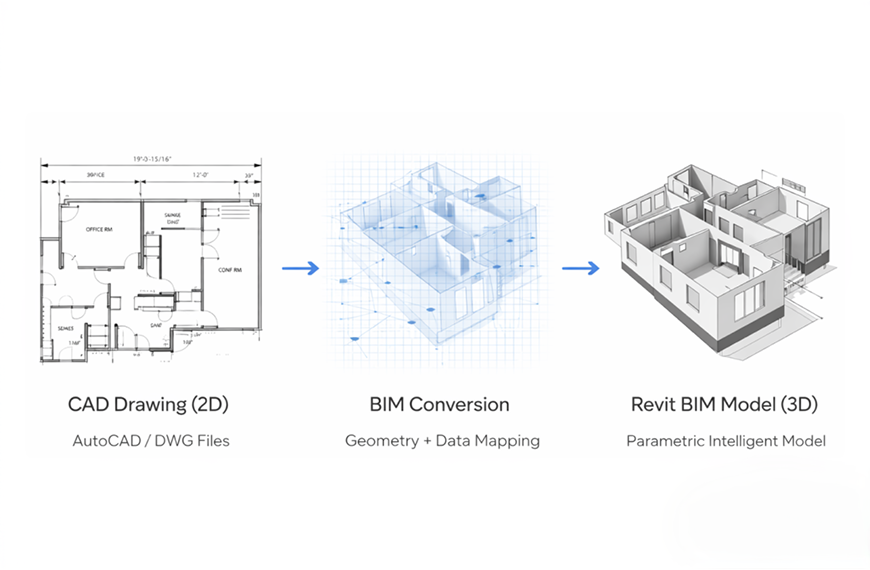
Millions of building projects worldwide still live in 2D AutoCAD files — flat lines, arcs, and layers that contain valuable design intelligence locked inside an outdated format. As the architecture, engineering, and construction (AEC) industry accelerates its shift toward Building Information Modeling, the challenge of CAD to Revit conversion has become one of the most pressing bottlenecks in modern project delivery.
Converting a 2D DWG drawing into a fully intelligent 3D Revit model is not a simple file format swap. It requires interpreting geometry, assigning building element classifications, embedding parametric data, and ensuring cross-discipline coordination. Done manually, it is one of the most tedious and time-consuming tasks in BIM workflows. Done with AI-powered automation, it becomes a strategic accelerator.
This guide covers everything you need to know about CAD to Revit conversion — from the traditional process and its challenges, to the AI-driven automation tools that are making manual remodeling obsolete. If your firm is still spending days redrawing CAD files in Revit, this is the roadmap to a better workflow.
CAD to Revit conversion is the process of transforming 2D AutoCAD drawings (typically .DWG or .DXF files) into intelligent, object-based 3D models in Autodesk Revit (.RVT files). This is fundamentally different from simply importing or linking a CAD file into a Revit project.
When you import a DWG into Revit, the 2D lines appear as a reference overlay — they remain unintelligent geometry with no BIM properties. True conversion, by contrast, transforms those flat lines into parametric Revit elements: walls with material properties, doors with clearance data, windows with thermal values, MEP components with flow attributes, and structural elements with load-bearing classifications. These intelligent objects support coordination, clash detection, quantity extraction, energy analysis, and construction documentation in ways that 2D CAD simply cannot.
The conversion scope typically includes architectural elements (walls, floors, roofs, ceilings, doors, windows), structural components (columns, beams, foundations), and MEP systems (HVAC ductwork, plumbing piping, electrical conduit, fire protection). The level of detail — commonly specified as LOD 100 through LOD 500 — depends on the project phase and intended use of the model.
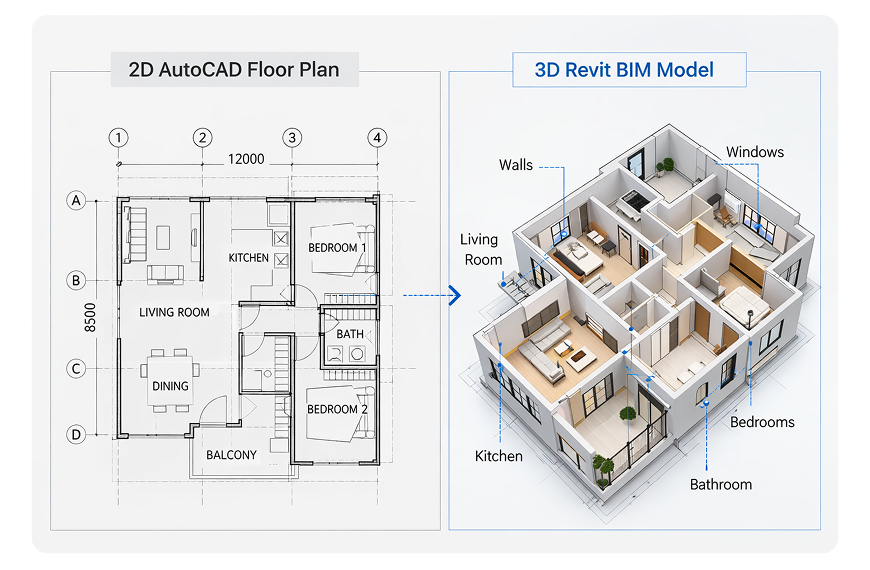
The business case for converting legacy CAD files to Revit BIM models is compelling, and it extends far beyond meeting a software preference. Several critical factors are driving conversion demand across the industry.
Automatic documentation consistency. In CAD, every plan, section, and elevation exists as a separate drawing that must be manually updated when changes occur. In Revit, all views are generated from a single 3D model — change a wall in plan and it updates automatically across every section, elevation, schedule, and sheet. This eliminates the coordination errors that account for a significant share of construction rework.
Clash detection and coordination. With all disciplines modeled in 3D, conflicts between structural, architectural, and MEP systems become visible before construction begins. CAD's 2D nature makes these clashes nearly impossible to detect until they become expensive field problems.
Quantity extraction and cost estimation. Revit models contain embedded data about every element — materials, dimensions, counts, and classifications. This enables automated quantity takeoffs that are far more accurate and faster than manual measurement from 2D drawings.
Client and regulatory requirements. Government agencies, institutional clients, and large developers increasingly mandate BIM deliverables. Firms that cannot produce Revit models risk losing major project opportunities, regardless of the quality of their CAD output.
Future-proofing project data. A Revit BIM model serves not only the design and construction phases but also facility management, renovation planning, and building performance analysis throughout the structure's lifecycle. CAD files have a much narrower utility window.
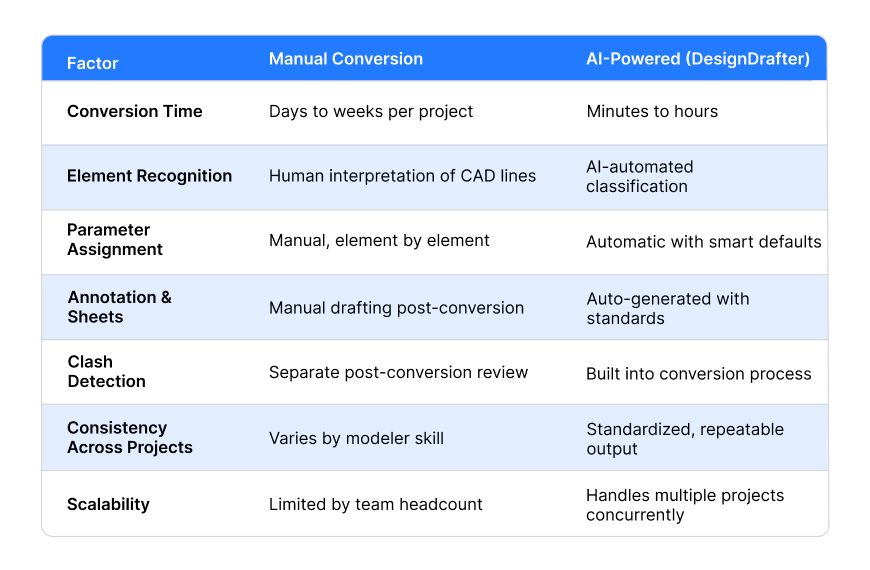
Before AI automation, CAD to Revit conversion followed a labor-intensive manual workflow. Understanding this process helps illustrate exactly where automation delivers its greatest value.
Open the DWG in AutoCAD and resolve inconsistencies in scale, layers, units, and redundant elements. Remove unused blocks, purge unnecessary data, and ensure layer naming follows a logical structure. This step alone can take hours for complex drawings.
Link or import the cleaned CAD file into Revit, aligning it to the correct level and coordinate origin. Verify unit scaling matches between the CAD file and the Revit project — mismatches cause elements to appear dramatically over- or under-sized.
Trace over CAD geometry to create native Revit elements — placing walls along CAD lines, inserting doors and windows at marked openings, drawing MEP routes over single-line diagrams. This is the most time-consuming phase and where the bulk of human labor is concentrated.
Assign materials, type parameters, classification codes, and performance data to each Revit element. This transforms raw geometry into BIM-ready objects that support coordination, analysis, and documentation.
Check the converted model for accuracy against the original CAD drawings. Verify dimensions, element classifications, spatial relationships, and code compliance. Resolve any discrepancies before issuing the model.
For a moderately complex building, this manual process can consume anywhere from several days to multiple weeks — representing a significant cost in skilled labor and project timeline.
Manual CAD to Revit conversion is prone to several recurring problems that inflate costs and compromise model quality.
Inconsistent CAD standards. CAD files received from external parties often have inconsistent layer naming, mixed units, duplicate geometry, and non-standard linework. Cleaning these files before conversion adds substantial overhead that is difficult to estimate upfront.
Double-wall tracing errors. CAD floor plans typically represent walls with two parallel lines. Tracing these as Revit walls requires careful centerline interpretation. Mistakes create double walls, gaps, and misaligned junctions that cascade through the model.
Loss of design intent. When BIM modelers manually interpret 2D drawings, nuances of the original design — spatial relationships, adjacency logic, clearance requirements — can be lost or misinterpreted. The converted model may be geometrically accurate but functionally incomplete.
Cross-discipline misalignment. When architectural, structural, and MEP drawings are converted separately by different team members, coordination errors between disciplines are common. Without simultaneous 3D analysis, clashes remain hidden until costly later-stage reviews.
Version control complexity. CAD files are frequently revised during the conversion process. Without robust version tracking, modelers risk converting outdated drawings or duplicating work already completed on previous revisions.
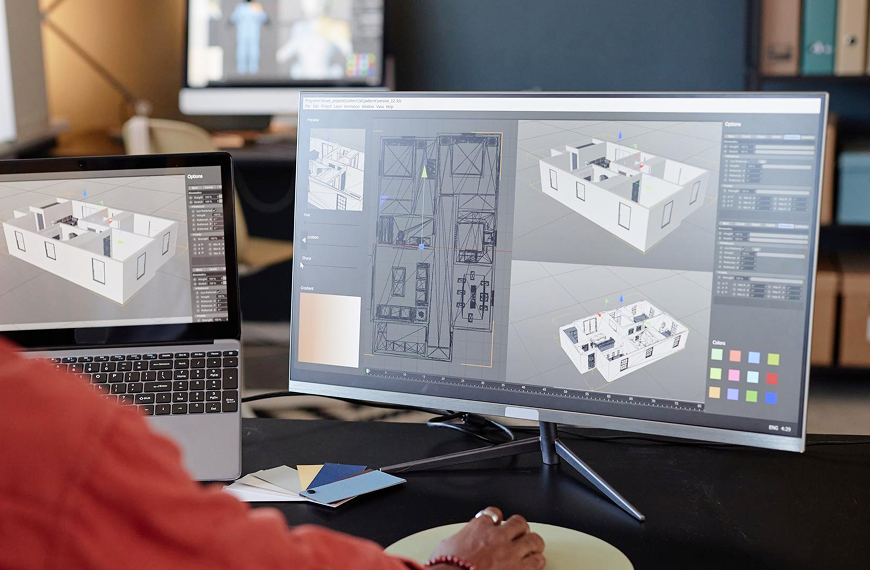
AI-powered BIM automation fundamentally changes the CAD to Revit conversion paradigm by replacing manual tracing and interpretation with intelligent, automated element recognition and 3D model generation.
Automated element recognition. Instead of requiring a human modeler to identify what each CAD line represents, AI analyzes the drawing's geometry, layer data, and spatial context to automatically classify elements — distinguishing walls from furniture, doors from windows, and structural members from partition lines.
Intelligent 3D generation. Once elements are classified, the AI generates corresponding Revit objects with appropriate parameters, dimensions, and categorization. Walls become parametric wall types with correct thickness and material assignments. Doors and windows are placed at correct locations with proper clearances. MEP components are modeled with system routing and connectivity.
Built-in clash detection. AI platforms analyze all converted elements simultaneously, identifying spatial conflicts between disciplines during the conversion process rather than requiring a separate post-conversion coordination review.
Automatic annotation and documentation. Beyond the 3D model, AI automates the generation of dimensions, annotations, section cuts, legends, schedules, and sheets — producing construction-ready documentation without the hours of manual drafting that typically follow conversion.
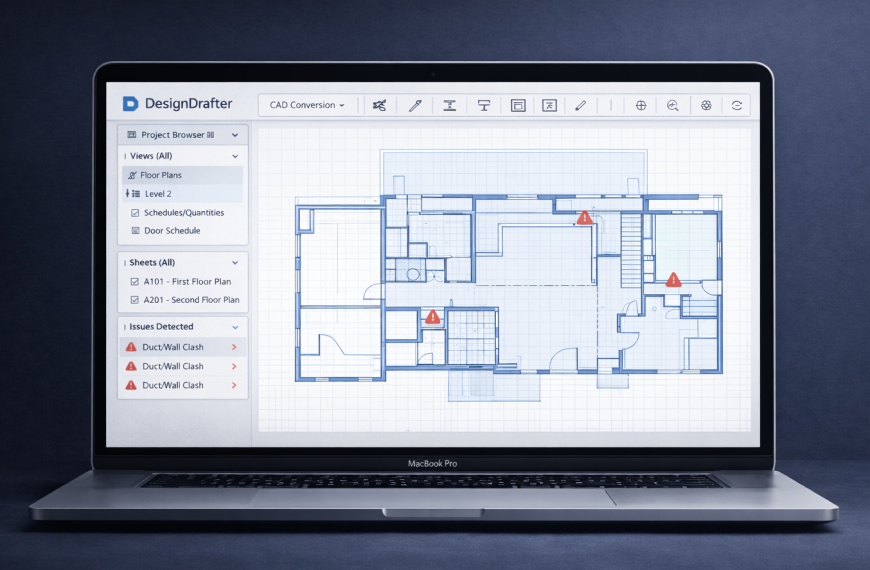
While many tools address fragments of the conversion workflow, DesignDrafter's Smart Drawing Development platform provides a comprehensive, end-to-end solution for CAD to Revit conversion — and everything that comes after it.
CAD to Revit Conversion Transform 2D CAD layouts into intelligent, BIM-ready 3D Revit models in minutes. The AI handles element recognition, classification, and parametric assignment automatically.
Annotation & Dimensioning Auto-apply aligned, linear, and radial dimensions with consistent formatting across multiple sheets and views — eliminating manual drafting.
Sections & Legends Automatically generate cross-sections, longitudinal sections, and standardized legends from your converted model. No manual slicing or formatting.
Clash Resolver AI-driven clash detection identifies conflicts between building elements and suggests optimized rerouting solutions — minimizing rework before construction.
DesignDrafter treats CAD to Revit conversion as the entry point to a fully integrated building design platform. From the same environment, you can generate AI-powered floor plans, run MEP and structural design calculations, produce automated quantity takeoffs for accurate BOQs, and compare building products with detailed technical parameters.
The platform delivers role-specific solutions for architects transitioning legacy projects to BIM, MEP consultants converting system drawings to coordinated 3D models, design firms managing high-volume conversion portfolios, and contractors and EPC companies who need BIM-ready models for fabrication and construction coordination.
CAD to Revit conversion is only the beginning. The real power of BIM emerges when the converted model feeds into downstream workflows that were previously siloed or manual.
MEP design calculations. Once architectural geometry exists in Revit, MEP calculation software can run electrical load analysis, HVAC sizing, plumbing design, and fire protection calculations directly against the model — ensuring system designs align with actual building geometry rather than abstracted inputs.
Automated quantity takeoffs. A properly converted BIM model enables one-click quantity extraction — counting every wall, door, fixture, and meter of piping with precision that manual measurement from CAD drawings cannot match.
Fabrication-ready output. For contractors, the converted Revit model can be extended to LOD 400 fabrication detail — generating spool drawings, hanger layouts, and manufacturing specifications that connect design directly to the shop floor.
Facility management handoff. At project completion, the BIM model becomes a digital twin of the as-built facility — supporting maintenance planning, renovation design, and operational optimization for decades beyond initial construction.
Not every project requires the same conversion strategy. The right approach depends on project scale, timeline, budget, and intended model use.
For one-off, small-scale projects with simple geometry, manual conversion by an experienced Revit modeler may be practical. The investment in automation tooling is harder to justify when the volume is low and the complexity is manageable.
For firms with recurring conversion needs — whether converting an existing portfolio to BIM, onboarding new projects from CAD-native clients, or managing ongoing renovation work — AI-powered automation delivers exponential returns. The time savings compound with each project, and the standardized output quality eliminates the variability that plagues manual conversion.
For large-scale, multi-discipline projects where architectural, structural, and MEP systems must be coordinated, automation is not optional - it is a competitive necessity. The ability to convert all disciplines simultaneously with built-in clash detection and automated documentation is what separates efficient firms from those drowning in rework and revision cycles.
Whatever your scale, the direction of the industry is clear: manual CAD to Revit conversion is becoming a legacy practice. Firms that invest in AI-powered BIM automation now will carry a significant competitive advantage as BIM mandates expand and project complexity accelerates.
July 2 , 2026
May 15 , 2026
June 12 , 2026