There is a question that comes up constantly in AEC firms across India and around the world right now, and it goes something like this: "We know we need to move to BIM, but which software do we actually use, and how does it fit into how we already work?"
It is a fair question. Because the phrase "building information modeling software" covers a genuinely wide territory. It includes everything from full-featured 3D modeling environments used by large enterprise teams, to cloud-based automation platforms that generate BIM-ready outputs from basic inputs, to niche tools that handle just one part of the BIM workflow really well. This guide is not going to give you a recycled list of logos and pricing tables. What it will do is help you understand what building information modeling software actually does, how it works across different disciplines and project phases, what to look for when evaluating it, and how AI is fundamentally changing what BIM software is capable of in 2026.
Whether you are an architect running a ten-person firm in Pune, an MEP consultant managing large commercial projects in Delhi, or a BIM manager at an EPC contractor in Hyderabad, this guide is written for you.
Most people have heard the standard definition. Building information modeling (BIM) is a process for creating and managing information about a building project across its entire lifecycle. The software is what makes that process possible.
But here is the part that often gets lost: BIM software is not just a drawing tool. A CAD program like AutoCAD lets you draw things. BIM software lets you build things digitally, with information embedded in every element.
When you place a wall in a BIM model, it is not just a line on a screen. It is an object with a type, a material, a thickness, a fire rating, a thermal value, and a cost. When you change that wall, everything connected to it, schedules, sections, elevations, quantities, changes too. This is what people mean when they call BIM software "intelligent."
The intelligence of building information modeling bim software comes from three things working together:
This is fundamentally different from drawing in 2D, and it is why firms that make the shift to proper BIM software report dramatic reductions in coordination errors, rework, and documentation time.
Not all BIM software is the same. Before you can choose the right tool, you need to understand what type of BIM software you are actually looking for.
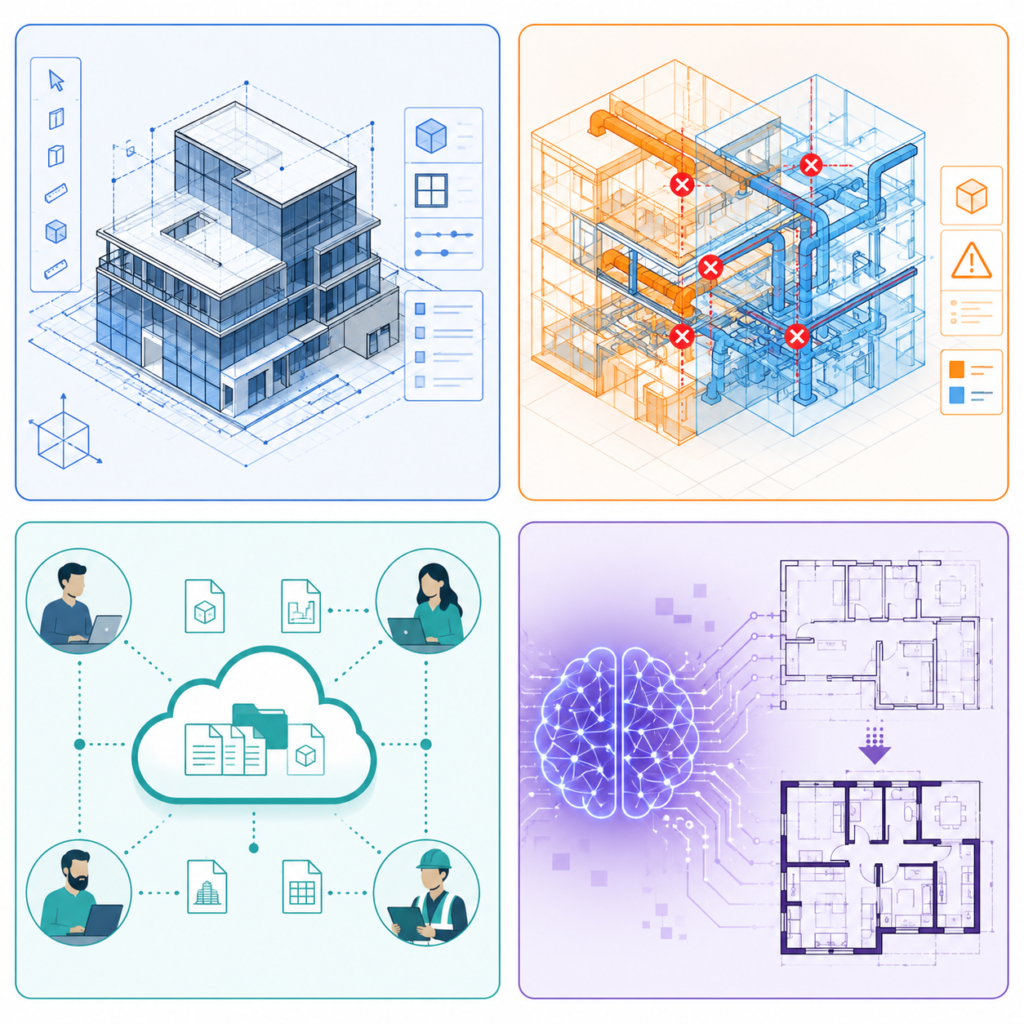
This is where 3D models are created. Autodesk Revit is the most widely used authoring tool globally. It covers architecture, structure, and MEP within one environment. ArchiCAD (by Graphisoft) is another well-established authoring platform, particularly popular in Europe. Bentley AECOsim Building Designer serves large infrastructure projects.
Authoring software is powerful, but it requires significant time investment to learn well and even more time to use well. The model does not build itself. Every element needs to be modeled, parameterized, and connected correctly by a trained professional.
Once multiple disciplines create their models, those models need to be federated and checked for clashes. Autodesk Navisworks is the standard tool here. It pulls together architectural, structural, and MEP models and lets coordinators run clash detection reports, identifying where pipes intersect beams or where ducts collide with structural elements.
This is valuable, but it is reactive. You are catching clashes after they have already been modeled, which means corrective modeling work still needs to happen.
For teams working across multiple offices or disciplines, collaboration platforms keep the model accessible and version-controlled. Autodesk BIM 360 (now Autodesk Construction Cloud), Trimble Connect, and Procore are examples here. These platforms manage who has access to what, track model revisions, and provide a centralized location for issue tracking and RFI management.
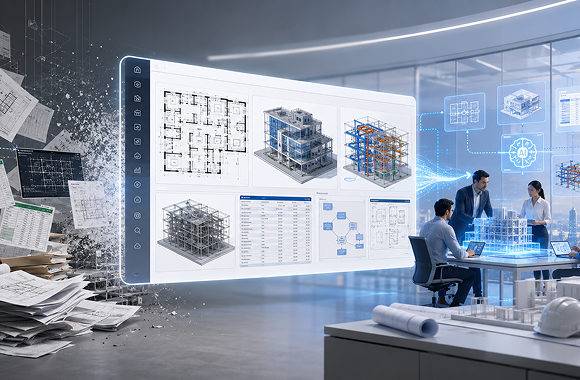
This is the category that is reshaping the industry in 2026. Instead of requiring skilled operators to manually create every element in a BIM model, AI-powered BIM platforms can generate BIM-ready outputs from inputs like CAD drawings, floor plan briefs, or engineering parameters.
DesignDrafter sits in this category. Rather than replacing the authoring environment, it removes the manual labor that happens before and around authoring. It converts CAD files to Revit models automatically, generates floor plan layouts from design briefs, runs MEP calculations that feed directly into the BIM workflow, and extracts quantity takeoffs from models without manual counting.
This category of building information modeling bim software is growing rapidly because it solves the single biggest barrier to BIM adoption: the time and skilled manpower required to create and maintain BIM models.
After construction, BIM software is increasingly being used by building owners and facility managers to operate and maintain assets. Tools like IBM Tririga, Archibus, and Bentley AssetWise connect the as-built BIM model to maintenance schedules, asset databases, and operations data, creating what many now call a digital twin of the facility.
One of the most misunderstood things about BIM is that it is not just for construction documentation. It adds value at every phase of a project's life. Here is how it actually works:
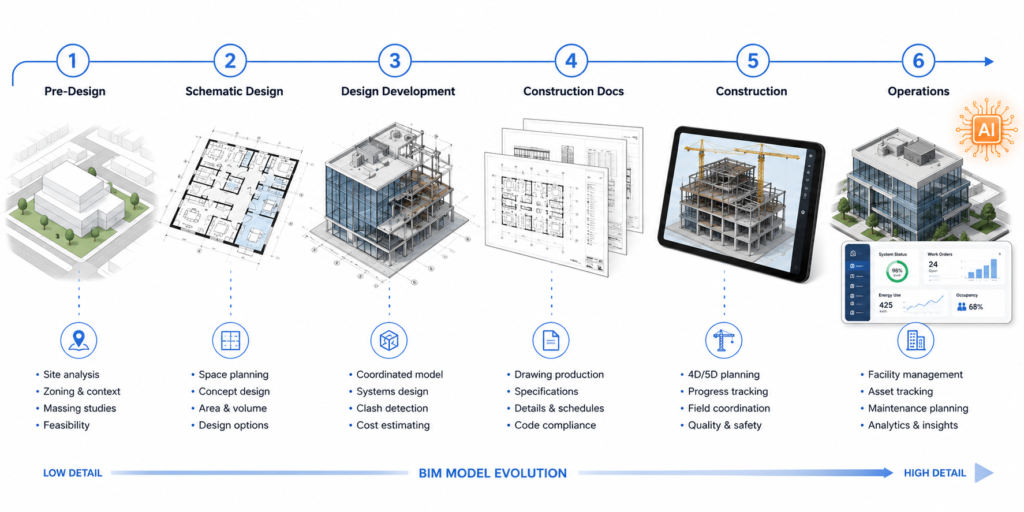
At this stage, architects and planners use BIM software to test massing, orientation, and site feasibility. Basic 3D volumes are placed on site, shadows are analyzed, and gross area calculations are extracted from the model to check feasibility against planning regulations or development briefs.
AI-powered tools like DesignDrafter's floor plan generation go further, generating complete layout options from design briefs in this phase, allowing multiple spatial configurations to be evaluated before any detailed modeling investment is made.
This is where the BIM model becomes increasingly detailed. Wall types are defined, structural grids are established, MEP zones are blocked out, and the design begins to carry real technical information. In India, this phase typically feeds into planning permission submissions and is where NBC compliance checks are most critical.
BIM software at this stage allows instant schedule extraction, area calculations, and early clash checking. Rather than preparing these manually, they come from the model automatically.
The BIM model generates drawings, not the other way around. When a wall changes position in the model, every plan, section, elevation, and detail that references that wall updates automatically. This phase is where BIM software saves the most obvious time for large projects, eliminating the manual cross-referencing work that occupied draftspeople in CAD-based workflows.
DesignDrafter's CAD to Revit conversion is directly relevant here for firms still working with CAD-drawn documentation. Instead of rebuilding legacy drawings as BIM models manually, the platform automates the conversion, producing annotation-complete, fully coordinated BIM documentation from existing CAD files.
Building information modeling software generates accurate quantity takeoffs from the model. Rather than estimators manually counting from drawings, quantities come directly from BIM objects: how many square meters of wall type A, how many linear meters of pipe type B, how many luminaires in Zone C.
This accuracy reduces pricing uncertainty during tender and creates a cleaner basis for contractor negotiations. DesignDrafter's AI quantity extraction module does exactly this, automatically pulling structured BOQ outputs from design data, as covered in the platform's AI quantity extraction workflow.
During construction, the BIM model serves as the reference document for site teams. Contractors use BIM viewers on tablets and site terminals to access the current model, mark up issues, and track RFI responses against specific model elements. 4D BIM links the model to the construction programme, allowing teams to visualize construction sequences and identify scheduling conflicts before they happen on site.
The handover of a BIM model to the building owner has real value when it is executed properly. COBie data (Construction Operations Building Information Exchange) structured within the BIM model gives facility managers a database of every asset in the building: equipment types, warranty periods, maintenance requirements, and performance specifications. This is the foundation of digital twin operations.
India's construction sector is the second-largest in the world. Yet BIM adoption in India has historically lagged behind comparable markets in the UK, US, Singapore, and Australia.
That is changing rapidly, and for specific reasons:
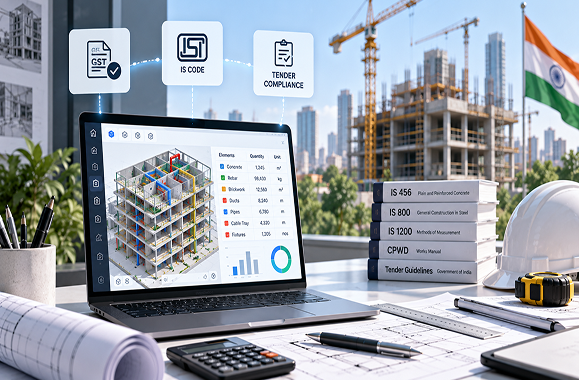
The Indian government's infrastructure pipeline under the National Infrastructure Pipeline (NIP) and PM Gati Shakti framework has made BIM a requirement on major public infrastructure projects. Government clients increasingly specify BIM deliverables in tender documents, pushing contractors and consultants to build BIM capability or lose access to large project opportunities.
Global corporations establishing offices, manufacturing facilities, and data centers in India routinely bring their international BIM standards with them. An Indian MEP consultant or design firm working for a multinational client in Bengaluru is expected to deliver to the same BIM Level 2 standards as their counterparts in London or Singapore.
This creates a pull effect. Firms that can deliver BIM-compliant documentation win more work from high-value multinational clients.
On large Indian construction projects, rework costs are significant. Studies from industry bodies consistently show that coordination failures discovered on site, rather than in the design model, cost multiples of what they would have cost if caught earlier.
As project complexity increases, particularly in mixed-use, healthcare, and data center construction, the MEP coordination demands exceed what manual CAD-based processes can handle reliably. BIM software's clash detection and coordination tools are not a luxury at this level of complexity. They are a cost control mechanism.
The original barrier to BIM adoption for small and medium AEC firms in India was straightforward: BIM software was expensive, and the skilled operators needed to use it were either expensive or unavailable.
AI-powered platforms like DesignDrafter are dismantling this barrier. By automating the most labor-intensive parts of BIM model creation (converting CAD to Revit, generating layouts, running MEP calculations), these platforms let smaller firms produce BIM-quality outputs without a full team of specialist BIM modelers. Architects and MEP consultants who previously found BIM adoption impractical now have an accessible entry point.
When evaluating building information modeling bim software for your practice or firm, these are the capabilities that actually matter:
The software should support smart objects that carry data and respond to changes. When you change a door size, every associated schedule, area calculation, and detail view should update automatically. This is the foundation of BIM value.
Good BIM software should handle architectural, structural, and MEP disciplines either within a single environment or through well-integrated federation. Coordination across disciplines is where the biggest BIM benefits are realized, and software that silos disciplines undermines this.
Look for IFC (Industry Foundation Classes) export capability. IFC is the open standard format that allows models created in one software to be opened, read, and used in another. Without IFC support, your BIM models are locked into one vendor's ecosystem.
COBie data support matters for facility management handovers. If your clients or contracts require structured asset data at project completion, your software needs to populate and export COBie data.
Either built-in or through seamless integration with coordination platforms, the software should support federated model review and clash reporting. Ideally, intelligent systems should predict potential clashes before they are modeled, not just detect them afterward.
In 2026, any serious evaluation of building information modeling bim software should consider automation capability. Can the software automatically update related elements when one changes? Does it use AI to generate initial layouts, identify risks, or flag coordination issues? Manual-only BIM tools are becoming progressively less competitive as AI-integrated platforms demonstrate the speed and accuracy advantages of automated workflows.
Modern BIM software should support cloud-based model sharing with version control, concurrent access management, and cross-location collaboration. On-premise only BIM setups create friction for multi-office teams and consultant collaboration.
For Indian firms, this means the software's outputs should be aligned with NBC, IS/IEC, ECBC, ASHRAE, NFPA, and other applicable standards. Internationally aligned firms may also need BS EN ISO 19650 compliance for BIM management processes.
Many firms in India still run CAD-based workflows and are evaluating whether the shift to building information modeling software is actually worth the disruption. Here is an honest look at the comparison:
The BIM software market in 2026 looks fundamentally different from 2020. AI has moved from being a buzzword in vendor presentations to being a core differentiator in day-to-day workflow value.
Here is what AI-driven building information modeling bim software actually does differently:
Instead of a designer manually placing every wall and room in a BIM authoring tool, AI generates complete, code-compliant layout options from a brief. The designer's role shifts from drafting to evaluating and refining AI-generated options, collapsing concept phase timelines dramatically.
Traditional BIM workflows separate design from calculation. An MEP engineer designs duct routing in the BIM model, then separately calculates duct sizes in a spreadsheet, then manually adjusts the model to match. AI-integrated platforms calculate and model simultaneously. When the design changes, calculations update automatically.
DesignDrafter's integrated MEP calculation modules for electrical, HVAC, plumbing, and fire fighting handle this integration, keeping design and calculation in sync without a separate manual reconciliation step.
As discussed in the DesignDrafter guide on AI clash detection in MEP coordination, the shift from reactive clash detection to predictive clash prevention is one of the most operationally significant changes in 2026 BIM software. Instead of finding clashes in a federated model review, AI identifies spatially risky design decisions before they become modeled clashes.
AI in building information modeling software now extracts quantity takeoffs with a level of accuracy and speed that was previously only achievable by dedicated estimating teams. The quantities come directly from BIM objects, structured into BOQ-ready formats, with markup and brand selection built into the workflow.
The emergence of AI Design Agents means teams can now interact with BIM workflows through natural language. Instead of navigating complex software interfaces to execute a task, a BIM professional can describe what needs to happen and the AI agent handles the execution. DesignDrafter's AI Design Agent functions exactly this way, executing complex tasks across layouts, MEP calculations, BOQs, and documentation based on conversational instructions.
BIM software is often discussed as if its value is uniform across all users. In practice, different AEC roles get different types of value from it:
For architects, building information modeling software delivers the most value in design coordination and documentation. Automatic schedule generation, section and elevation consistency, integrated MEP clash checking, and 3D visualization directly from the design model reduce the time architects spend on documentation and coordination, freeing more capacity for design decisions.
Platforms designed for Indian architects add NBC compliance validation, early MEP feasibility checking, and AI layout generation on top of standard BIM capabilities.
For MEP consultants, BIM software enables fully coordinated 3D design across mechanical, electrical, and plumbing systems within the same model as the architectural and structural elements. Clash detection, routing optimization, and automatic documentation from the model replace the manual coordination processes that generated most MEP rework in 2D workflows.
MEP-focused design firms using AI-integrated BIM platforms can now automate MEP calculations and model generation simultaneously, rather than running them as separate processes.
For firms managing full project delivery from design through construction, building information modeling software creates a unified project data environment. Design decisions, cost data, schedule information, and procurement details all reference a single model, reducing the data fragmentation that creates project delivery risk on complex builds.
EPC contractors particularly benefit from BIM's quantity extraction accuracy during procurement and the construction coordination benefits of clash-free models before site work begins.
Having reviewed the BIM implementation challenges of Indian firms and global AEC practices, there are patterns in where implementations go wrong:
India's BIM adoption story in 2026 is one of accelerating momentum, but with meaningful gaps that still need to be bridged.
Large-scale infrastructure contractors, multinational project delivery firms, and metropolitan design practices have generally achieved functional BIM delivery capability. They use established authoring tools, maintain BIM execution plans, and deliver model-based documentation as a matter of course.
Mid-size MEP consultancies, regional architectural firms, and smaller EPC operators are where the adoption gap is most significant. These firms have the knowledge that BIM is the direction of travel, but face real barriers in software cost, training time, and the disruption of transitioning active project delivery workflows.
This is precisely the segment that AI-powered building information modeling software serves most effectively. By automating the highest-effort parts of BIM model creation, platforms like DesignDrafter allow firms without deep BIM modeling teams to produce BIM-quality outputs for their projects. The entry point to BIM value is no longer conditional on having a team of full-time BIM modelers.
The shift that is happening in Indian AEC is not just from CAD to BIM. It is from manual-everything to intelligently automated. Firms that understand this are positioning themselves for the next decade of Indian construction growth. Those still equating BIM adoption with "buying Revit" are likely to find themselves behind the curve faster than they expect.
There is no universally correct answer here. The right building information modeling bim software for your firm depends on your project types, team size, client requirements, and technical capacity. But these are the questions that will help you get to the right answer:
The most common reason firms delay BIM adoption is not lack of knowledge that it is valuable. It is uncertainty about where to start.
Here is a practical starting framework:
Step 1: Audit your current workflow gaps. Where are the most expensive mistakes happening? Where does rework eat the most time? Where do coordination failures show up? These pain points map directly to the BIM capabilities that will deliver the most value fastest.
Step 2: Identify your next suitable pilot project. Choose a new project, not an in-progress one. Ideally a project where BIM deliverables would strengthen your proposal or where the client has expressed interest in BIM outputs.
Step 3: Evaluate software against your specific workflow. Do not evaluate BIM software in the abstract. Test it against your actual project types, your existing CAD file formats, and your client output requirements. Platforms like DesignDrafter offer a free trial with no credit card requirement, allowing hands-on evaluation before any financial commitment.
Step 4: Address the CAD legacy systematically. If your biggest implementation friction is the backlog of CAD-documented projects, deploy automated conversion tools rather than manual redrafting. The time savings are substantial and the quality of automated BIM conversion has reached a point where it competes favorably with manual remodeling.
Step 5: Build toward full lifecycle BIM. Start with the phases where BIM delivers the clearest and fastest return: design coordination and documentation. Then progressively extend BIM use into quantity extraction, construction coordination, and facility management handover as your team's capability matures.
The firms winning the best work in Indian AEC right now are not necessarily the biggest. They are the ones that use building information modeling software intelligently, combine established authoring tools with AI-powered automation, and deliver BIM-quality project outputs faster and with fewer coordination failures than their competitors.
That combination is what DesignDrafter is built to enable. Start your free trial today and see what AI-integrated BIM software can do for your next project.
Building information modeling software in 2026 is not the complex, enterprise-only technology it was perceived to be a decade ago. AI has made BIM accessible, practical, and faster for firms of every size.
The core value remains what it always was: one intelligent model that coordinates all disciplines, updates automatically when anything changes, and carries the project data from design through construction into operations. What has changed is how much of the work of creating and maintaining that model can now be automated.
For Indian AEC professionals, the combination of growing client requirements for BIM deliverables, government infrastructure mandates, and the availability of AI-powered platforms that reduce BIM implementation barriers means the question of adoption is increasingly one of timing, not principle.
The time to move is now. Whether you start with a CAD to BIM conversion, an AI-generated floor plan, or a fully integrated MEP calculation workflow, the entry point exists for your firm. Use it.
FAQ

Building information modeling software is used to create intelligent 3D digital models of buildings where every element, walls, slabs, columns, doors, windows, MEP systems, carries embedded data about its properties, materials, performance, and cost. It is used across the full building lifecycle: for design exploration and feasibility at concept stage, for coordinated multi-discipline documentation during design development, for clash detection and construction coordination during procurement and construction, and for asset management and facility operations after project handover. The core value of BIM software over traditional CAD is that changes made in the model automatically update all associated drawings, schedules, and quantities, eliminating the manual cross-referencing that creates coordination errors in 2D documentation workflows.
There is no single “best” BIM software because different tools serve different purposes in the workflow. Autodesk Revit remains the most widely used authoring platform globally for architectural, structural, and MEP modeling. Autodesk Navisworks is the standard for federated model coordination and clash detection. For AI-driven BIM automation including layout generation, CAD to Revit conversion, MEP calculation integration, and automated BOQ extraction, platforms like DesignDrafter are purpose-built for AEC professionals who need BIM-quality outputs without the full manual modeling workload of traditional authoring tools. The best approach for most firms is to use a combination: an authoring tool for final documentation and a BIM automation platform for the upstream design and conversion workflows where AI delivers the most time savings.
BIM (Building Information Modeling) is the process and methodology: the set of practices, standards, and information management disciplines that govern how building data is created, shared, and used across a project lifecycle. BIM software is the technology that enables this process. You can have a BIM process without any particular software, but in practice, BIM software is what makes the process scalable and practically useful. Conversely, having BIM software installed does not mean you are doing BIM. Many teams use Revit as an expensive 3D CAD tool without following information management disciplines, coordination standards, or lifecycle data requirements that constitute genuine BIM practice.
Yes, and increasingly this is the most cost-effective path for small firms. AI-powered BIM platforms have specifically reduced the barriers that made BIM inaccessible to small practices: high software costs, long training periods, and the need for dedicated BIM modeling staff. Platforms like DesignDrafter are built for solo practitioners and small teams, offering AI layout generation, MEP calculation automation, and CAD to BIM conversion on subscription plans starting with a free trial. A small firm can now produce BIM-quality deliverables for clients without a full BIM team by using AI to automate the modeling and documentation workflows that previously required specialist operators.
BIM is not universally mandatory across all project types in India in 2026, but it is a specified requirement on many government infrastructure projects and is increasingly required by sophisticated private sector clients. The Bureau of Indian Standards and the National BIM Program have been actively developing the framework for wider BIM adoption, and industry expectation among major clients has shifted significantly. Practically, firms that cannot deliver BIM-compliant outputs are excluded from a growing share of large, high-value Indian construction projects. The question is no longer whether BIM adoption is coming. It is whether your firm is positioned for it before it becomes a formal barrier to tendering.
LOD stands for Level of Development (sometimes also called Level of Detail). It defines how much information is embedded in BIM model elements at each stage of a project. LOD 100 is conceptual massing with approximate dimensions. LOD 200 includes generic systems with approximate quantities. LOD 300 has specific, detailed geometry with accurate dimensions as drawn. LOD 350 includes interface information for coordination with other systems. LOD 400 is fabrication-level detail used for construction. LOD 500 is the as-built condition used for handover and facility management. Client BIM requirements typically specify which LOD is required at each project milestone, and the software and team effort required to achieve higher LODs increases significantly as the number increases.
In a BIM model, architectural, structural, and MEP elements are all modeled as 3D objects in the same coordinate space. Clash detection software federates these separate discipline models together and systematically checks whether any objects from different systems occupy the same space (hard clashes) or come within a defined minimum clearance distance of each other (soft clashes). In traditional CAD workflows, these conflicts were only discovered when site teams tried to install elements in locations the design had not properly coordinated. In BIM, they are detected in the model, before any physical work begins. AI-powered platforms go further, predicting where clashes are likely to occur based on design patterns, allowing preventive routing decisions rather than just post-hoc conflict resolution.
IFC (Industry Foundation Classes) is an open, vendor-neutral file format for BIM data. It is the international standard (ISO 16739) that allows BIM models created in one software (such as Revit) to be opened, reviewed, and used in another software (such as ArchiCAD or a clash detection tool) without losing the intelligence of the model objects. IFC export is critical for open collaboration environments, government project requirements, and any workflow where multiple stakeholders with different software platforms need to access the same model data. When evaluating building information modeling bim software, IFC export capability is a baseline requirement for any firm working in multi-party project environments.
AI is changing building information modeling software in several ways that collectively shift BIM from a documentation tool to an intelligent design and delivery platform. Generative AI creates initial BIM-ready layouts from brief inputs, eliminating manual initial modeling. Machine learning analyzes project data to predict coordination risks before they become modeled conflicts. Natural language interfaces allow BIM professionals to interact with models and workflows through conversational commands rather than navigating complex software menus. AI-powered quantity extraction generates accurate BOQs directly from model data in real time. Automated compliance checking validates designs against codes and standards continuously during the design process rather than as a separate post-design audit. These changes are compressing timelines, reducing errors, and making BIM practice accessible to smaller, less specialist teams.
BIM Level 2 is the UK government-developed definition of collaborative BIM practice where all project disciplines produce their own BIM models in a managed data environment, with information exchanged in common formats (typically IFC or COBie) and coordinated against project information requirements defined in a BIM Execution Plan (BEP). It has become an international reference standard for BIM maturity rather than just a UK requirement. Software that supports BIM Level 2 delivery needs to include authoring with IFC export, COBie data structuring, document and model management in a Common Data Environment (CDE), and audit-trail version control. Revit with Autodesk Construction Cloud is the most common software combination for Level 2 delivery internationally.
April 16 , 2026
May 18 , 2026
September 22 , 2026