In Short
Clash detection in BIM is the process of testing combined architectural, structural, and MEP models for conflicts before construction. Clashes are hard (physical overlap), soft (missing clearance), or workflow (sequencing). Standard tools check geometry only, so reports contain many false positives. AI ranks clashes by importance, groups noise, and suggests fixes, but a qualified engineer must approve every change. Teams comparing a Navisworks alternative should test tools on their own models for speed, file support, and reporting.
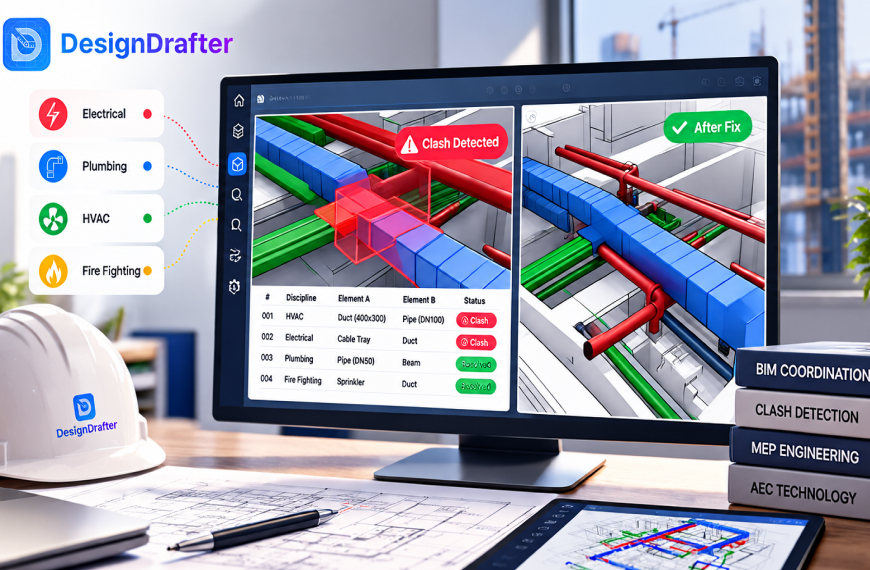
Good MEP coordination starts with one simple habit, which is testing your models for conflicts before anyone orders material or opens a trench. Clash detection in BIM does that by laying the architectural, structural, and MEP models on top of each other and flagging every place two elements collide. AI now helps sort those results and suggest fixes, so teams spend less time scrolling and more time deciding.
Most coordination teams know the pain. A model check returns thousands of clashes, and half the room argues about issues that never mattered. This guide explains what clash detection is, how MEP coordination works in practice, where AI helps, what it cannot do, and how to think about a Navisworks alternative if your current setup feels heavy.
Clash detection in BIM is the process of checking combined building models for places where elements conflict. It matters because every conflict found on screen costs minutes to fix, while the same conflict found on site costs days, material, and an awkward call to the client.
Think of it as a rehearsal. Before the building exists, the ducts, pipes, trays, beams, and walls sit in one shared model, and the team works through the clash list until the design is clean enough to build.
The cost of skipping this step is real. One industry article on MEP coordination notes that rework from design and coordination issues can reach 5 to 15 percent of project cost, citing a third party source. Treat that as a general range and not a promise, but it shows why a few hours of checking on screen is cheap insurance.
A breakdown from Novatr splits clashes into three groups. A hard clash is a physical overlap, such as a plumbing pipe passing through a concrete column. A soft clash is a clearance problem, where nothing touches but there is no room for access, such as an electrical panel with no space in front of it. A workflow clash is a sequencing problem, such as ceiling finishes planned before the services above them are tested.
Software finds hard clashes well. Soft clashes need clearance rules set up by a person, and workflow clashes usually live in the schedule, so they depend on human planning.
MEP coordination is the process of fitting mechanical, electrical, and plumbing systems into a building so every trade can install its work in the space it was promised. It works best as a repeating cycle, because each fix can create a new problem somewhere else.
The ceiling void is where most of the drama happens. Ducts are large, pipes need slope, cable trays need access, and sprinklers must reach every room. All of them compete for a few hundred millimetres of height under a beam, and someone has to give way. Here is a simple cycle that works for most projects.
Step one is the one teams skip. If one model sits a few metres off because of a coordinate mistake, the report fills with nonsense. Step four needs clear rules too. A common approach is to give priority to elements that are hard to move, such as structure and gravity drainage, and ask flexible systems like small ducts and conduits to adjust. Write your rules down early.
Traditional clash detection creates noise because it checks geometry only. It does not know what an element is for, who owns it, or whether the overlap matters, so it reports everything that touches, including things no engineer would worry about.
A post on AI in MEP coordination describes pipes passing through slab openings that were never modelled, fixtures intersecting placeholder ceiling tiles, and sprinklers routed around structure as common sources of false alarms. That article is a vendor blog and gives no measured results, so read its numbers as examples.
The noise hurts in three ways.
Better tolerances and focused tests between specific pairs of models reduce clutter, and many teams get a large improvement from those alone. The gap that remains is where AI is being used.
AI helps with MEP conflicts in two ways. It sorts clash results by importance, so critical items come first, and it suggests possible fixes, such as moving or resizing an element. A person still reviews and approves each change, because design responsibility does not move to the software.
AI does not replace the geometry check. It works on top of that result, deciding which clashes deserve attention and what might resolve them.
The usual method is learning from past decisions. According to the same article, these tools study how a team handled earlier clashes, whether accepted, critical, or ignored, and then rank new ones to match. Items the team normally ignores sink down the list, and items that look like past serious issues rise to the top. Some tools also use meaning and not only shape, so they know a pipe belongs to plumbing and a beam belongs to structure, which helps predict which trade should move.
The same article is open about the limits. It says that without firm specific training the benefit over a standard clash tool is small, that most firms lack clean records of past clash decisions, and that the first six months show only modest gains. AI is not magic on day one.
For fixes, tools look at the space around a clash and test simple options, such as shifting a pipe a few hundred millimetres, lowering a duct, or rerouting a cable tray around a beam. They check whether the new position creates a fresh clash and rank the options that work.
A suggested move is only as good as the rules behind it. The software may not know that a duct needs a straight run for airflow, that a drain needs a minimum slope, or that a fire rated wall cannot be penetrated in that spot. Think of AI as a very fast junior assistant. It reads the whole report, groups the noise, and proposes a first answer, while a human who can sign for the design makes the decision.
A good workflow keeps the model clean at the start, uses AI to sort and suggest in the middle, and keeps human approval at the end. The order matters because AI cannot fix a messy model and cannot take responsibility for a design.
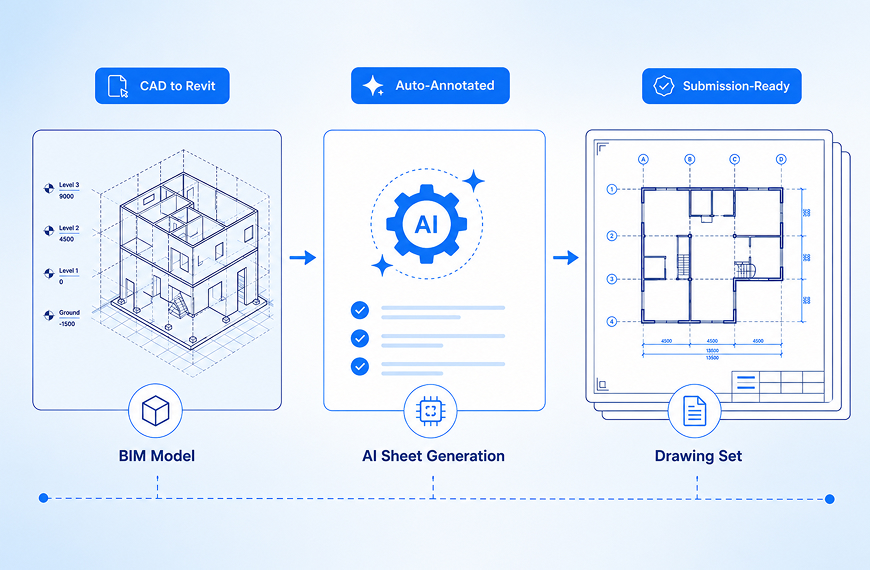
Start with the source. If your MEP model began as 2D drawings, the quality of that conversion sets the ceiling for everything after it, and sloppy conversion creates fake clashes such as pipes floating a few millimetres off position. Our CAD to Revit conversion guide explains how to build a clean model first.
Then run the tests in pairs and let the AI tool rank the results. Review the top first, spot check the bottom, and keep a record of which clashes were real and which were ignored. That record becomes the training data that improves any tool over time.
Yes, several. Navisworks is widely used and still a solid choice, but many teams look for a Navisworks alternative because of cost, speed on large models, or the need for cloud based teamwork. The right pick depends on your project size, your software stack, and how many people need access.
On price, Capterra lists Navisworks from about 140 dollars per month on its Basic plan, with no free version. Reviewers praise it inside the Autodesk environment but mention a crowded interface, slow imports on big files, and the need for a strong computer. Check the current price on the vendor site before you plan a budget.
Novatr names Solibri, Autodesk Construction Cloud, Trimble Connect, and Revizto as other common coordination platforms. The table gives a simple view of how they are generally described. Test any tool on your own models.
| Tool | Main strength | Good fit for | Watch out for |
|---|---|---|---|
| Navisworks | Strong model federation and clash tests | Teams already in the Autodesk stack | Heavy on large models |
| Autodesk Construction Cloud | Cloud coordination and issue tracking | Distributed teams and contractors | Setup and licence planning |
| Solibri | Rule based model checking | Quality checks beyond clashes | Rule setup takes time |
| Revizto | Issue tracking and visual review | Meetings with many people | Another platform to learn |
| Trimble Connect | Open collaboration across tools | Mixed software teams | Fewer built in rule options |
Ask a few questions before choosing. How big are your models? Do site teams need issues on a phone? Does the tool read IFC without losing data? A Navisworks alternative will not fix a bad process either, so fix late models and unowned clash lists first.
The biggest mistakes come from process, not software, and each one is easy to fix once you notice it.
Link coordination with quantities too. Every time a clash fix changes a duct size or a pipe route, your material list changes. Teams that update their quantity extraction after each round avoid surprises in the bill of quantities and in tender comparisons.
DesignDrafter is an AI platform for floor plans, quantity takeoff, MEP work, and CAD to BIM conversion, and it positions its MEP consultants solution around the design side of the job. In a coordination workflow, the useful parts are the early and late stages, which are building a clean model and keeping quantities and calculations in step with it.
I could not verify every feature from the public pages while preparing this guide, so I will not claim that a specific clash tool is built in. The sensible way to judge it is to test it. Use the trial, which offers 3 days and 50 AI credits with no card required, on a real project with known problems. Check how clean the model is and whether it fits the clash tool you already use. Sizing and routing choices are also easier when your design calculation work sits in the same project. If the trial saves real hours, you can review current pricing and decide.
Clash detection in BIM works because it moves arguments from the site to the screen, where they cost almost nothing. AI makes that move faster by sorting thousands of results into a short, ranked list and offering first answers on how to resolve them. It cannot replace the coordinator, the engineer, or the habit of starting early. Start with a clean model, use AI to sort and suggest and not to decide, and choose any Navisworks alternative by testing it on your own project, not by reading a feature list.
Founder
Manas Krishna is a Mechanical Engineer and infrastructure technology entrepreneur with 20+ years of experience in MEP (Mechanical, Electrical, and Plumbing) engineering, public health engineering, and transport infrastructure projects across India.
FAQ

Clash detection in BIM is the process of checking combined architectural, structural, and MEP models for conflicts, such as a duct passing through a beam. It finds problems on screen before construction, when fixing them costs minutes instead of days, material, and delays on site.
There are three main types. Hard clashes are physical overlaps, such as a pipe through a column. Soft clashes are clearance problems, such as no access space in front of a panel. Workflow clashes are scheduling conflicts, such as finishing a ceiling before services above it are tested.
MEP coordination is the process of fitting mechanical, electrical, and plumbing systems into a building so every trade has space to install its work. It uses combined models, clash tests, and regular meetings, and it repeats until the critical conflicts are closed before work begins on site.
AI sits on top of the standard geometry check. It ranks clashes by importance, groups similar items, filters noise, and can suggest fixes such as moving or resizing an element. A coordinator still reviews each suggestion, because design responsibility stays with the engineer and not the software.
AI can suggest fixes and test whether they create new clashes, but automatic changes without review are risky. Software may miss duct airflow needs, drain slope, or fire rated wall limits. Treat suggestions as a fast first draft and let a qualified person approve each change.
Common options include Autodesk Construction Cloud, Solibri, Revizto, and Trimble Connect. The best choice depends on model size, your existing software, and team access needs. Test any tool on your own models, and check file format support, speed, and reporting before committing to a licence.
Yes, for many teams. Navisworks is widely used, strong at combining models, and fits well inside the Autodesk stack. Reviewers do mention a crowded interface and slow imports on large files, so check performance on your own projects and consider alternatives if cost or cloud access matters more.
Start as soon as the first coordinated models exist, ideally in schematic or early detailed design. Early clashes are cheap to fix because layouts are still flexible. Repeat the checks in short rounds, because every fix can create a new conflict somewhere else in the building.
DesignDrafter positions its platform for MEP consultants, covering design support, quantity extraction, and CAD to BIM conversion, and it offers a 3 day trial with 50 AI credits and no card. Test it on a real project and confirm which coordination features you need before relying on it.
September 28 , 2026
July 13 , 2026
July 14 , 2026