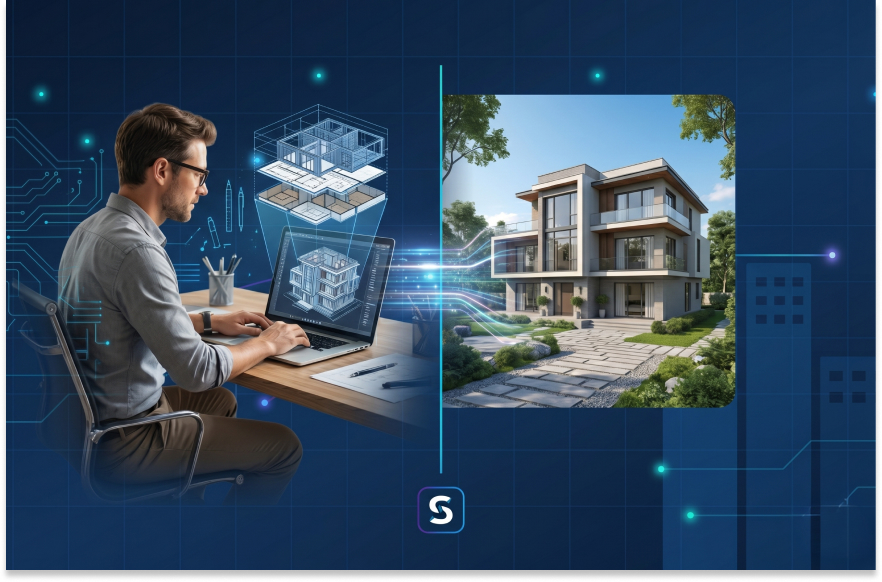
Every structure that gets built today starts as an idea. Turning that idea into something tangible, something a contractor can actually construct and a client can actually understand, is where 3D building design comes in. At its core, 3D building design is the process of creating a three-dimensional digital representation of a building before any physical work begins. Instead of flat lines on paper, you get a fully interactive model that shows walls, rooms, facades, structural elements, and spatial relationships exactly as they would appear in real life.
Think of it this way. A traditional 2D drawing shows you the footprint of a room. A 3D building design lets you walk through that room, look up at the ceiling height, check whether natural light reaches the kitchen, and understand how the staircase connects the ground floor to the first floor. It is the difference between reading about a place and actually experiencing it before it exists. 3D building design is not limited to aesthetics. It also serves as a technical foundation for engineering analysis, structural validation, MEP (mechanical, electrical, and plumbing) coordination, and regulatory compliance checks. When done right, it becomes the single source of truth for an entire project team, from the architect who envisioned the space to the contractor who pours the foundation.
Over the past few years, the shift toward cloud-based and AI-driven platforms has made 3D building design far more accessible. You no longer need a high-end workstation running expensive licensed software. Many modern 3D building design software platforms run entirely in the browser, allowing professionals to design, iterate, and collaborate from anywhere.
Construction projects are expensive. They are complex. And they involve dozens of people who all need to be looking at the same picture. This is exactly why 3D building design has become indispensable in modern project delivery. One of the biggest reasons professionals rely on 3D building design is early error detection. When you build a 3D model, you can spot spatial conflicts, design inconsistencies, and structural issues long before they become costly on-site problems. A misaligned beam, an undersized corridor, a clashing duct route: all of these become visible the moment you model them in three dimensions.
Beyond catching mistakes, 3D building design dramatically improves communication across stakeholders. Clients who struggle to interpret floor plan drawings can instantly understand a 3D walkthrough. Contractors can review the construction sequence visually. Engineers can coordinate their systems against the architectural model in real time. Everyone gets clarity, and that clarity translates directly into fewer change orders, fewer delays, and lower project costs. There is also a sustainability angle that is becoming harder to ignore. 3D building design allows architects to test different material choices, analyze energy performance, and optimize spatial layouts before committing to construction. This means less material waste, better energy efficiency, and buildings that perform well throughout their lifecycle.
For firms that work on building design calculations alongside architectural layouts, having a 3D model as the design backbone ensures that engineering systems like electrical, HVAC, plumbing, and fire safety are all coordinated within the same spatial context. The result is a building that does not just look good on screen but actually works when built.
The short answer is almost everyone involved in the building lifecycle. But let us get specific, because understanding the audience helps you appreciate why 3D building design software has become a critical investment.
Architects are the most obvious users. For them, 3D building design software is the primary workspace where conceptual sketches transform into detailed, buildable models. It allows them to experiment with form, test spatial relationships, and produce presentation-quality visuals for client approvals. If you are an architect exploring AI-assisted tools for layout generation, platforms like DesignDrafter's AI Floor Plan Generator let you move from room requirements to a structured 3D-ready floor plan in a matter of minutes.
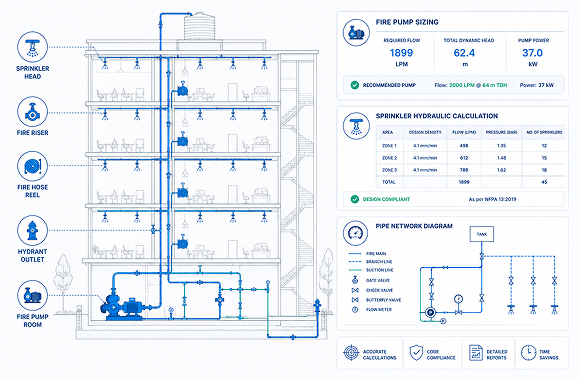
Structural and MEP engineers rely on 3D building design to coordinate their systems within the architectural framework. Electrical conduit paths, HVAC duct routes, plumbing risers, and fire safety layouts all need to fit within the building geometry without clashing with each other. Having a shared 3D model as the single reference point makes this coordination far more efficient. For a deeper look at how AI is automating this coordination, see our guide on AI clash detection in MEP coordination. Real estate developers use 3D building design to evaluate feasibility quickly. Before committing capital to a project, they need to know how many units fit on a site, what the saleable area looks like, and whether the design meets local zoning requirements. A 3D model answers all of these questions in a visual, immediate way.
Interior designers work with 3D design software to plan finishes, furniture layouts, lighting schemes, and material palettes within the spatial context of the architectural model. Rather than guessing how a marble countertop looks under artificial lighting, they can simulate it. Contractors and construction managers use 3D design during the pre-construction and execution phases to plan construction sequences, identify logistical challenges, and generate accurate quantity takeoffs. If you are involved in estimation workflows, you might find our article on AI-powered quantity takeoff software relevant.
Architecture and engineering students also benefit significantly. Learning 3D building design early in their education prepares them for the realities of modern practice, where 2D-only skills are no longer sufficient.
Not all 3D building design software is built the same. The market ranges from basic modeling tools to fully integrated AI platforms that handle everything from design generation to engineering validation. Here are the features that actually matter when choosing a tool for professional work.
The best 3D design software does not just let you draw shapes. It understands architectural rules. It knows that a bedroom needs a minimum area, that a corridor should maintain a certain width, and that wet areas should be clustered for plumbing efficiency. Look for software that uses parametric logic and rule-based engines to generate designs that are not only visually coherent but also technically sound.
You should be able to see your 3D building design update in real time as you modify parameters. If changing the number of floors requires waiting for a manual rebuild, the tool is outdated. Real-time rendering, including interior walkthroughs and exterior facade views, is now a baseline expectation.
A 3D design is only as useful as the engineering data it supports. Software that integrates structural analysis, MEP design calculations, load balancing, and code compliance checking directly within the 3D environment saves enormous amounts of time and reduces coordination errors.
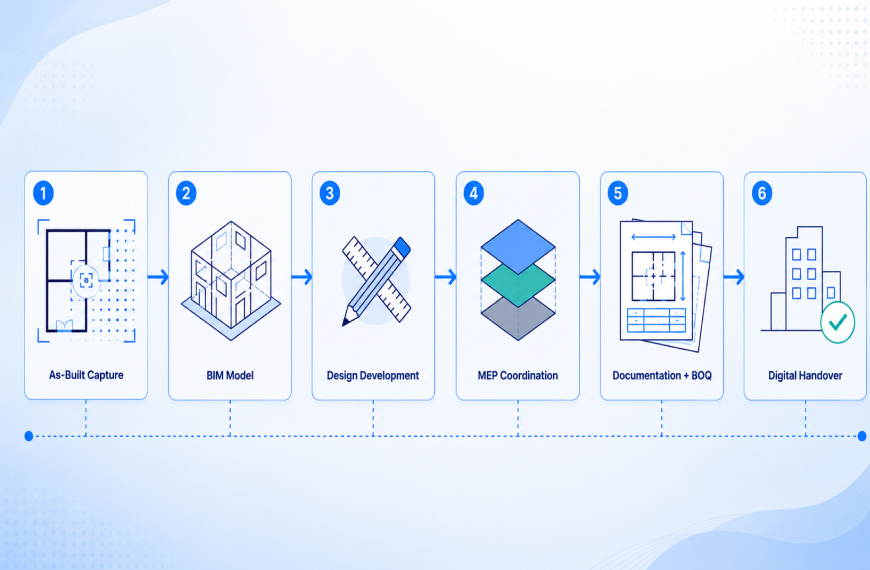
Professional workflows demand interoperability. Your 3D design software should export in standard formats like IFC, DWG, RVT, and PDF. It should also support BIM (Building Information Modeling) workflows so that the 3D model carries embedded data about materials, costs, and specifications. If BIM integration is a priority for your team, our deep dive on BIM automation covers how AI is eliminating manual rework in this space.
Modern project teams are distributed. The 3D building design software you choose should support cloud-based access so that architects, engineers, and clients can view and comment on the same model from different locations without version control nightmares.
This is the feature that separates current-generation tools from legacy software. AI-powered 3D building design software can automatically generate layout options, optimize spatial arrangements for maximum usable area, and validate designs against local building codes. It turns hours of manual iteration into minutes of intelligent generation.
The integration of artificial intelligence into 3D building design is not a minor upgrade. It is a fundamental shift in how buildings get designed.
Traditionally, the 3D design process started with an architect manually drafting a concept, converting it to a 3D model using software like Revit or SketchUp, running it through separate engineering analysis tools, making revisions based on feedback, and then repeating this cycle multiple times. This workflow is time-consuming, error-prone, and deeply dependent on the individual skill of the designer.
AI changes this equation at every stage.
In the concept phase, AI can generate multiple 3D design options from a simple set of inputs: site dimensions, number of floors, unit types, target area ratios, and design preferences. Instead of starting from a blank canvas, the architect starts from a curated set of intelligent options and refines from there.
During the development phase, AI continuously validates the design against technical constraints. Is the floor-to-ceiling height compliant? Are fire escape routes within permissible distances? Does the structural grid align with the architectural layout? These checks happen in the background, in real time, as the 3D building design evolves.
For engineering integration, AI-driven platforms connect the architectural 3D model directly to calculation engines for electrical, HVAC, plumbing, and fire safety systems. This means the moment you finalize a floor layout, the platform can automatically size ducts, route pipes, and calculate electrical loads without switching to a different tool. Our blog on electrical load calculation for buildings explains how this process works step by step.
AI also accelerates documentation. Drawing sheets, quantity schedules, material lists, and cost estimates can be auto-generated from the 3D building design model. What used to take a team days can now be produced in hours.
Perhaps the most transformative aspect is that AI remembers context. Advanced AI design agents can understand project-specific preferences, recall previous design decisions, and suggest improvements based on accumulated project intelligence. This is not hypothetical technology. It is available today and being used by architecture firms and MEP consultants across the industry.
If you have never used AI-powered 3D building design software before, the workflow might seem complex at first glance. In practice, it is surprisingly intuitive. Here is a general step-by-step process that reflects how most modern platforms, including DesignDrafter, approach 3D building design.
Start by entering the basic information about your project. This includes the plot shape and dimensions, the building type (residential, commercial, mixed-use), the number of floors, the target number of units or rooms, any specific regulatory constraints, and the desired built-up area. The more precise your inputs, the better the AI can tailor the output.
Once your parameters are set, the AI engine generates an optimized floor plan. This is not a random arrangement of rooms. The software applies spatial logic, adjacency rules, circulation efficiency standards, and wet area clustering to produce a layout that is architecturally viable. You can learn more about how this generation process works in our article on AI floor plan generators in architectural design.
The generated floor plan automatically extends into a 3D building model. You can navigate the model, inspect room dimensions, check ceiling heights, and evaluate the facade from different angles. If something does not feel right, you adjust the parameters and the AI regenerates instantly. This iterative loop is where the real power of AI-driven 3D design shows itself, because each iteration takes seconds, not hours.
With the architectural model in place, the platform can run integrated engineering calculations. Electrical load analysis, HVAC sizing, plumbing network design, and fire safety compliance checks all happen within the same environment. The 3D design becomes the technical foundation for every engineering discipline.
Once you are satisfied with the design, export the 3D model and accompanying documentation. Standard outputs include DWG files for CAD workflows, IFC files for BIM coordination, PDF drawings for client presentations, and Excel-based quantity takeoffs for cost estimation. If your team uses Revit, you may also want to explore the CAD to Revit conversion workflow that DesignDrafter supports.
Share the 3D building design with your project team and clients. Cloud-based platforms allow real-time collaboration, so feedback can be incorporated on the spot rather than through lengthy email chains.
There is still a segment of the industry that relies heavily on 2D drafting for building design. While 2D drawings have their place, understanding the practical differences helps make the case for why 3D design has become the standard for serious project delivery.
In 2D drafting, the architect creates separate plans, sections, and elevations. Each view is an independent drawing. If you change a wall position on the plan, you have to manually update the section and elevation drawings too. In 3D building design, the model is the single source. Change a wall in the model, and every plan, section, and elevation updates automatically.
Coordination between disciplines is another area where the gap is significant. In a 2D workflow, an architect sends floor plan drawings to the MEP engineer, who overlays their systems on a separate drawing. Clashes are discovered late, often during construction. In a 3D building design workflow, all disciplines work on or reference the same model. Clashes are detected automatically and resolved before a single brick is laid.
Client communication is also fundamentally different. Showing a client a set of 2D drawings and expecting them to understand the space is a challenge. A 3D design walkthrough communicates the experience of the space in a way that no flat drawing ever can.
Cost estimation in 2D workflows requires manual measurement and calculation. In 3D design, quantities are extracted directly from the model, which reduces human error and speeds up the estimation process considerably. Our guide on AI quantity takeoff tools explores how this automated extraction is transforming construction estimation.
The bottom line is that 2D drafting still works for simple tasks, but for projects of any meaningful complexity, 3D building design is no longer optional. It is the expected standard.
Adopting 3D building design is not without its hurdles. Here are the most common challenges professionals face and practical ways to address them.
Traditional 3D building design software like Revit, ArchiCAD, and 3ds Max are powerful, but they require significant training. The learning curve can be months long, which is a barrier for smaller firms and individual practitioners. The solution is to look for AI-powered platforms that simplify the interface. When the software handles the heavy lifting of model generation, the user can focus on design decisions rather than tool commands.
Older 3D building design tools demand powerful workstations with dedicated graphics cards and large amounts of RAM. This is a real constraint for teams in developing markets or remote locations. Cloud-based 3D design software eliminates this problem entirely by running the computation on remote servers and delivering the output through a standard web browser.
Many projects require data to flow between multiple software platforms. A 3D building design created in one tool might need to be used in another for structural analysis, and in yet another for MEP coordination. Look for platforms that export in open, industry-standard formats like IFC, DWG, and XLSX to minimize friction.
One of the most frustrating aspects of 3D design is that the architectural model and the engineering calculations often live in separate silos. Changes in one do not automatically reflect in the other. Integrated platforms that combine architectural design with MEP calculations within a unified environment solve this problem by keeping everything connected.
As teams grow, managing access, version control, and collaboration within a 3D building design project becomes complex. Cloud-native platforms with role-based access and real-time syncing are the most practical solution for design firms and contractors handling multiple projects simultaneously.
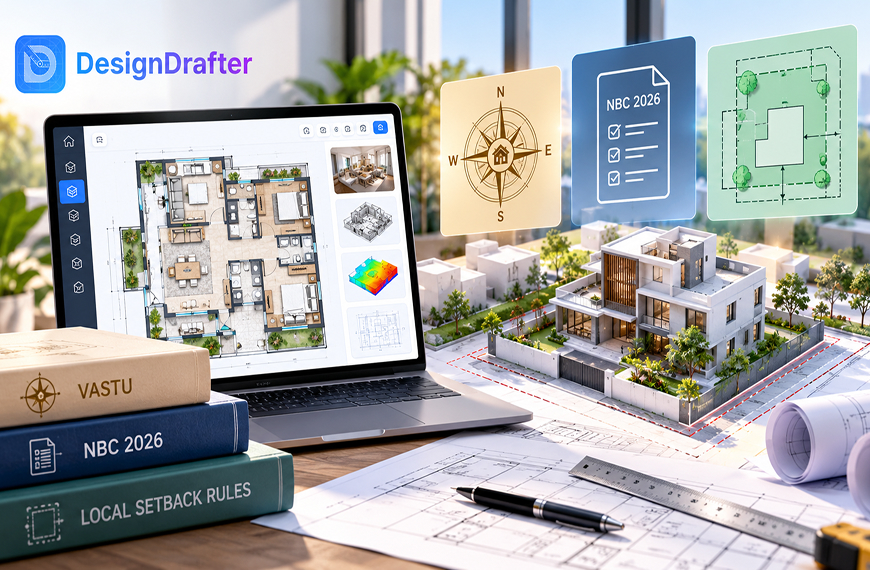
DesignDrafter is an AI-powered building design platform built specifically for architects, engineers, and construction professionals who need to move from concept to coordinated design quickly and accurately.
Here is how DesignDrafter fits into the 3D building design workflow.
The platform starts with intelligent floor plan generation. You define your project requirements, including plot dimensions, room counts, building type, and area targets, and the AI generates structured, buildable floor plans that respect spatial logic, adjacency rules, and circulation standards. These floor plans serve as the foundation for 3D building design, as each layout is ready to extend into a full three-dimensional model.
Beyond layout generation, DesignDrafter integrates engineering calculations directly into the design process. Electrical load analysis, HVAC sizing, plumbing system design, and fire safety compliance are all handled within the same platform. You do not need to export your 3D design to a separate tool for engineering validation.
For teams that work in BIM environments, DesignDrafter supports smart drawing development and CAD-to-Revit conversion, making it simple to take a design from the DesignDrafter platform into Revit for further detailing or coordination.
The platform also includes automated quantity takeoff, which extracts material quantities directly from the design data and structures them into BOQ-ready outputs. And for teams evaluating building products, the technical product comparison feature lets you compare MEP equipment side by side using detailed engineering parameters.
DesignDrafter is designed for professional teams of all sizes. Whether you are a solo architect exploring layout options, a mid-sized MEP consultancy running engineering calculations, or a large EPC contractor coordinating multi-discipline projects, the platform scales to fit your workflow.
If you want to see how it works, start for free and explore the 3D building design capabilities firsthand.
3D building design has moved well beyond being a visualization novelty. It is now the central nervous system of modern building projects, connecting architectural intent to engineering precision, cost estimation, regulatory compliance, and client communication in a single, intelligent model.
The introduction of AI into 3D design software has accelerated this evolution dramatically. Tasks that once required days of manual work, from generating floor layouts to running MEP calculations to producing construction documentation, can now be completed in a fraction of the time with greater accuracy.
For architects, engineers, developers, and contractors, adopting 3D building design software is no longer a question of if but when. The tools exist today to design smarter, build faster, and deliver better outcomes on every project.
Platforms like DesignDrafter are making this transition practical by combining AI-powered layout generation, integrated engineering calculations, BIM automation, and automated documentation in one unified workspace. If you are ready to upgrade how you approach building design, the technology is here, and it is ready to work for you.
FAQ

3D building design is the process of creating a three-dimensional digital model of a building that accurately represents its spatial layout, structural elements, facades, and interior spaces. It allows architects and engineers to visualize, analyze, and coordinate a building project before construction begins, reducing errors and improving decision-making.
The best 3D building design software depends on your project needs. For AI-powered automated design with integrated engineering calculations, DesignDrafter is an excellent choice. For manual modeling, tools like Revit, ArchiCAD, and SketchUp are popular. The key is to choose software that supports real-time 3D visualization, BIM compatibility, and collaborative workflows.
Yes. Several modern 3D building design software platforms are entirely cloud-based and run in your web browser. DesignDrafter, for example, allows you to generate floor plans, create 3D models, and run engineering calculations directly from your browser without any software installation.
AI improves 3D building design by automating layout generation, validating designs against building codes in real time, optimizing spatial arrangements for efficiency, and integrating engineering calculations directly into the design workflow. This reduces manual effort, catches errors early, and speeds up the overall project timeline.
Absolutely. Cloud-based 3D building design software eliminates the need for expensive hardware and large teams. Platforms with AI-driven automation allow even solo practitioners to produce professional-grade 3D building designs, engineering documentation, and cost estimates without the overhead of traditional workflows.
Professional 3D building design software should support industry-standard formats including DWG (for CAD), IFC (for BIM interoperability), RVT (for Revit), PDF (for presentations and documentation), and XLSX (for quantity takeoffs and cost sheets). Open format support ensures smooth collaboration across teams and tools.
3D building design focuses on creating a visual and spatial model of a building. BIM (Building Information Modeling) extends this by embedding data into the model, such as material properties, cost information, construction schedules, and facility management data. In practice, 3D building design is the visual foundation, and BIM adds the intelligence layer on top. Many modern platforms, including DesignDrafter, support both.
July 23, 2026
October 5, 2026
June 23, 2026