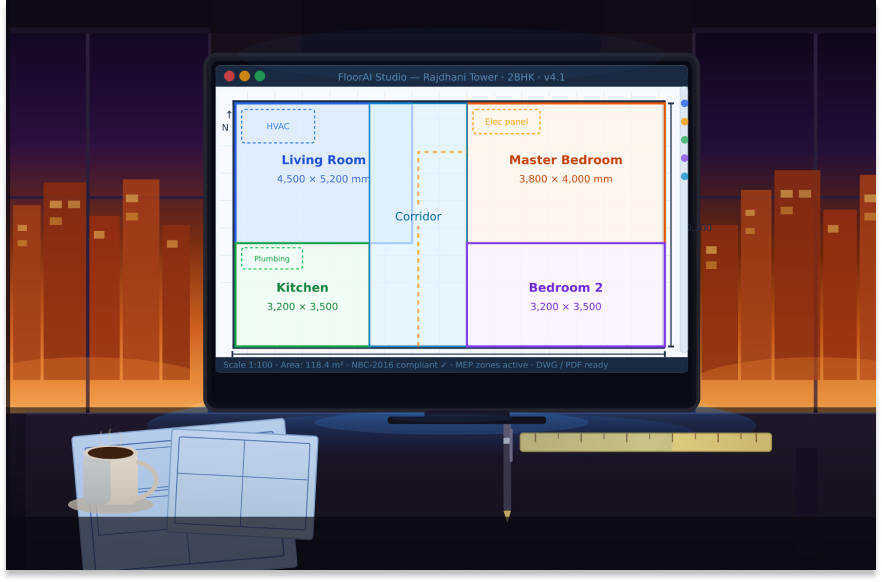
If you have ever sat down with a blank canvas trying to figure out where to start a floor plan, you already know how time-consuming and mentally exhausting that first phase of design can be. You are juggling client requirements, local building codes, structural logic, space efficiency, and project timelines, all at once. And all before a single wall line gets drawn.
That is exactly why the rise of the AI floor plan generator is not just a technical novelty. It is a genuine shift in how buildings get designed.
But here is the thing most articles miss: they talk about which tools exist, but almost nobody explains how the entire process actually works. What happens after you press "generate"? What inputs does the AI actually need? Why does one output look intelligent and usable while another looks like it was randomly assembled? And how do you take an AI-generated floor plan into a real project without spending hours cleaning it up?
This guide answers all of that. Whether you are an architect running a solo practice, a BIM manager at a large MEP firm, or a developer trying to understand how to speed up pre-design approvals, this is the most complete practical walkthrough of AI floor plan generation you will find. We will cover the technology behind it, the step-by-step process from brief to build-ready layout, common mistakes that waste your time, and how platforms like DesignDrafter are integrating AI floor planning into a full building design workflow.
An AI floor plan generator is a software system that uses artificial intelligence to automatically create architectural floor plan layouts based on user-defined inputs. Rather than manually drafting every room, corridor, wall, and opening, you define the parameters and the AI explores layout options that satisfy those constraints.
The output is not a random sketch. A well-built floor plan generator AI considers room adjacency logic, space utilization ratios, natural light access, circulation efficiency, structural grid alignment, and in some cases, local building code compliance, all before presenting you with a usable layout.
This is fundamentally different from early-generation room planners or drag-and-drop tools. Those tools help you draw faster. An AI floor plan generator helps you think faster by eliminating the blank-page problem and giving you structured, defensible starting points.
To be clear, a floor plan generator AI is not a replacement for architectural judgment. It does not understand your client's personality, their vision for the space, or the contextual sensitivity of the site. Those things still require a trained human mind. What it does replace is the repetitive, time-consuming work of exploring and validating early-stage layout options.
Understanding what is happening under the hood will help you get better results and avoid wasting time with inputs that confuse the model.
At its core, a floor plan generator AI is a constraint satisfaction system. You define hard constraints (non-negotiable rules like minimum room sizes, number of units, fire egress requirements) and soft constraints (preferences like "bedrooms should face east" or "the kitchen should be adjacent to the dining area"). The AI explores layout combinations that satisfy as many constraints as possible, ranked by how well they meet the full set of objectives.
This is similar in logic to how structural engineers run optimization algorithms, except applied to spatial arrangement rather than material properties.
One of the most important aspects of a good AI floor plan generator is how it handles adjacency. Rooms in a building are not independent. The relationship between a toilet and a bathroom, between a lobby and a lift core, between a kitchen and a utility area, all of these relationships affect the livability and functionality of the final layout.
Modern floor plan AI tools model these as graphs where rooms are nodes and adjacency requirements are edges. The AI tries to generate layouts where connected nodes are physically adjacent or accessible within a reasonable circulation distance.
Many newer platforms, including DesignDrafter's AI Floor Plan Generator, use models trained on large datasets of real-world architectural drawings. This means the AI has seen thousands of residential, commercial, and institutional floor plans and has internalized patterns about what makes layouts work well for each typology.
When you ask it to generate a 3BHK apartment layout, it is not starting from scratch. It is drawing on learned spatial patterns from a vast reference set, then applying your specific constraints on top of that foundation.
The most useful floor plan generator AI systems are not one-shot generators. They allow you to review output, modify individual constraints, and re-generate or refine in real time. This iterative feedback loop is what separates a useful design tool from a novelty generator.
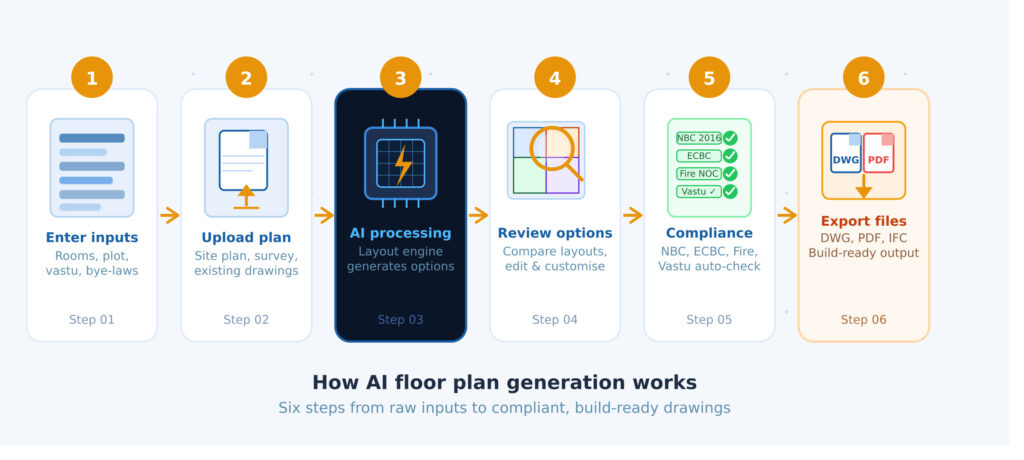
This is the practical part. Let us walk through the actual process, as you would experience it using a professional AI floor planning tool.
Before you touch any tool, you need to translate your project brief into structured inputs. This means converting client requests like "I want a spacious home with good natural light" into precise parameters.
The key inputs most AI floor plan generators need include:
The more clearly you define these, the better your first-generation output will be. Ambiguous inputs lead to generic outputs.
If you have existing context documents like a site plan, a client sketch, or a previous project layout that you want to reference, most professional AI floor plan tools allow you to upload these. The AI will try to incorporate the spatial logic of these references into the generated layout.
Once your inputs are in, run the generation. Depending on the platform and complexity, this typically takes between 30 seconds and a few minutes. The output is usually presented as one or more layout options.
At this stage, do not evaluate aesthetics. Evaluate logic. Ask yourself:
This is where the real design work begins. Your job now is to act as the intelligent reviewer, not the drafter. Look for:
Adjust your constraints based on what you observe, and re-generate or manually refine the layout. Good AI floor plan tools allow you to lock certain rooms in place while allowing the AI to rearrange others.
An AI-generated layout is only useful if it is buildable. Before moving forward, you need to validate against:
Platforms like DesignDrafter build some of these validation checks directly into the layout generation process, which is a significant time saver for professional projects.
Once you have a validated layout, export it in the format your workflow needs. This could be a DWG file for further CAD work, a PDF for client presentation, or a BIM-ready model for multi-discipline coordination.
Not all inputs are equally important. Here are the ones that have the biggest impact on output quality.
The geometry of the plot and the location of the main entry are foundational to everything else. An AI floor plan generator that does not know where the entry is will generate layouts that may be internally logical but externally disconnected from the actual site.
Always define your entry point, the street-facing edge, and any setback constraints before generating.
There is a common mistake where architects enter room count without specifying area targets. This leads to layouts where the AI distributes space evenly across all rooms, which may not reflect the actual design intent. A master bedroom and a servant room should not be the same size.
Specify minimum and preferred areas for each room type. The AI will respect these as constraints in its optimization.
Most floor plan generator AI tools allow you to specify which adjacency relationships are mandatory and which are preferred. Being deliberate about this makes a huge difference in output quality. For example:
The same square footage generates very different layouts depending on whether you flag it as residential, commercial, or hospitality. The AI's trained patterns for a hotel floor plan are completely different from those for a residential apartment. Always set typology explicitly.
One of the most overused phrases in AI design tools is "build-ready output." It is worth understanding what this actually means before you rely on it.
A truly build-ready AI-generated floor plan includes:
Many AI floor plan tools generate visually convincing outputs that are not actually buildable without significant rework. The tell-tale signs are walls that do not align to any structural logic, doors placed in structural members, rooms with no ventilation access, and corridor widths that fall below minimum standards.
When evaluating an AI floor plan generator, always check whether it generates outputs that a structural or MEP engineer can work from directly, or whether it requires a full redraw. The former saves you days of work. The latter just moves the effort downstream.
DesignDrafter's approach is specifically engineered to generate layouts that integrate with downstream MEP calculations and BIM workflows, which is what separates a professional-grade tool from a concept sketcher.
AI floor plan generation is not a one-size-fits-all solution. The approach, inputs, and validation requirements differ significantly across building typologies.
For residential projects, the primary concerns are unit efficiency (carpet area to super built-up area ratio), privacy (bedroom placement away from common areas), and natural light access. AI floor plan tools for residential projects should be able to handle:
In commercial floor planning, the critical variables are net lettable area (NLA) efficiency, core-to-perimeter depth, and flexibility for future fit-out. An AI floor plan generator for commercial buildings needs to understand open-plan versus closed-room typologies and produce layouts that allow multiple fit-out configurations.
Institutional floor plans have the most complex adjacency and code requirements. Hospitals, for instance, require clean and dirty circulation paths to never intersect. Schools require classroom orientation for natural light while keeping corridors safe and supervised. These constraints require an AI system that is specifically trained or configured for institutional typologies.
Mixed-use projects add a vertical complexity where different floors have different typologies, different structural needs, and different MEP systems. A floor plan generator AI used for mixed-use projects should be able to maintain structural alignment across floors while accommodating different spatial programs on each level.
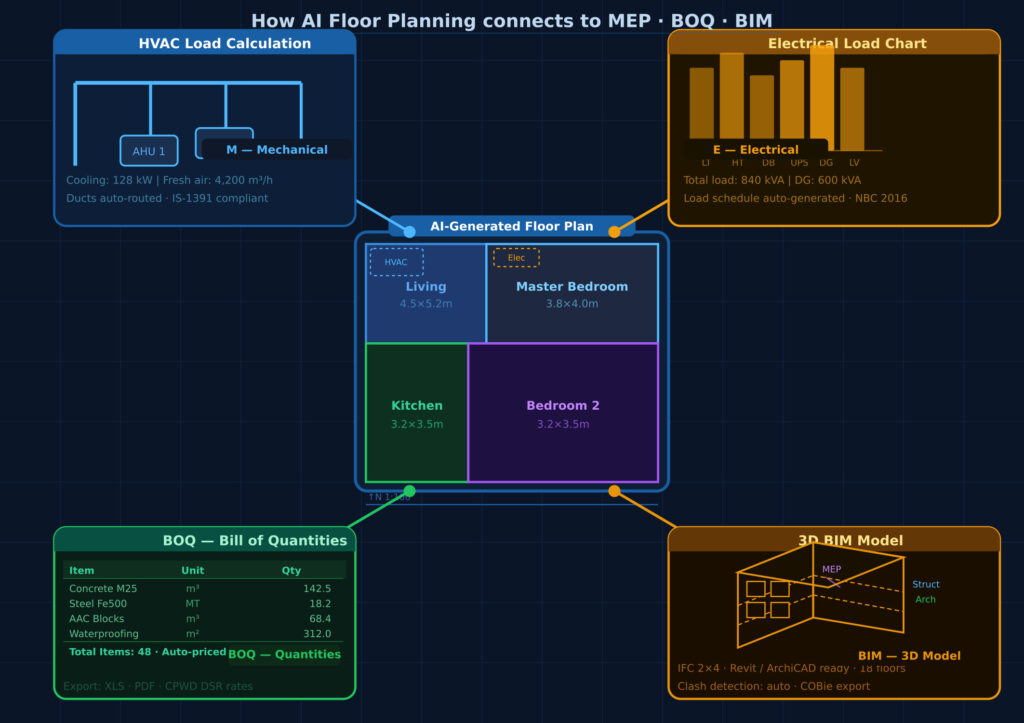
This is where AI floor plan generation moves from being a concept tool to being a production tool.
A floor plan is not just a drawing. It is a spatial database. Every room, wall, door, and window in that plan carries data: dimensions, area, orientation, adjacency, material, and function. When your AI floor plan generator produces a structured, data-rich output rather than a flat image, that data can flow directly into downstream workflows.
Once your floor plan is generated, the room-by-room data can feed directly into MEP calculations. Room areas and occupancy types inform air conditioning load calculations (HVAC sizing). Room counts and fixture types drive plumbing system sizing. Building orientation and window areas affect lighting calculations and electrical load estimates.
Without an AI-generated, structured floor plan, this data has to be manually extracted and re-entered into each calculation module. With a connected platform like DesignDrafter, the floor plan data flows automatically into MEP design and calculation workflows, eliminating re-entry errors and saving multiple hours per project.
Quantity takeoffs traditionally require a quantity surveyor to manually measure every element from printed or digital drawings. An AI-generated, structured floor plan enables automated BOQ extraction because the spatial data is already machine-readable.
Wall lengths, floor areas, door and window counts, and room finish schedules can all be extracted programmatically from a data-rich floor plan. This is the real value of building your design workflow around a connected AI platform rather than using isolated point tools.
The logical endpoint of any professional AI floor plan generation workflow is a BIM model. Ideally, your AI-generated layout should be exportable directly into a BIM authoring environment or convertible into object-based BIM elements without a full manual redraw.
The DesignDrafter AI Design Agent takes this further by understanding the full project context across all disciplines, remembering design decisions made at the floor plan stage, and applying that context to MEP coordination, BOQ generation, and documentation.
Based on how these tools are actually being used in practice, here are the most common errors that lead to wasted time and disappointing results.
The AI's first-generation output is a starting point, not a finished design. Architects who accept it without review and refinement often discover downstream problems during coordination. Always treat generation as the beginning of a design conversation, not the end.
The more structured your inputs, the more targeted your output. Architects who describe a project vaguely and expect the AI to figure out the rest get generic, unsatisfying results. Invest 15 minutes in structured input preparation and you will save hours of rework.
Floor plan generator AI tools optimize for spatial relationships, not structural systems. If you accept a layout without checking column spacing, load-bearing wall logic, or slab depth implications, you create coordination problems that cost significantly more to fix later in the process.
An AI trained primarily on international data may not correctly reflect NBC, local authority development control regulations, or state-specific building bylaws. Always verify setbacks, FSI compliance, parking provisions, and staircase requirements against local standards before presenting to a client or applying for approvals.
The biggest waste of potential is using an AI floor plan generator as a standalone tool disconnected from the rest of your workflow. The real productivity gains come from connecting your floor plan generation to MEP calculations, quantity takeoffs, and BIM coordination in a unified workspace. Architects who use platforms designed for end-to-end building design report dramatically higher time savings than those using separate, disconnected tools.
DesignDrafter is built specifically for architects, MEP engineers, and building design firms who need more than a concept sketcher. The platform's AI Floor Plan Studio is designed around how professional building design actually works.
Rather than a simple input-output generator, DesignDrafter provides an intelligent canvas where you define your requirements and explore layout options in a professional design environment. The AI generates structured, build-ready floor plans while you maintain full control over which elements to adjust, iterate, or lock in place.
For the Indian AEC market specifically, DesignDrafter's layout engine respects NBC norms, local development control regulations, and ECBC guidelines. This means the layouts it generates are not just spatially logical but also submission-ready from a compliance standpoint.
Unlike standalone floor plan tools, DesignDrafter connects your architectural floor plan directly to MEP design calculation modules covering electrical load analysis, HVAC sizing, plumbing system design, and fire safety. The same platform handles quantity takeoffs from the layout data, eliminating re-entry and minimizing errors.
Architects and design firms using the DesignDrafter solution for architects report significantly faster project delivery cycles because design, calculation, and documentation happen in one connected workspace.
Beyond floor plans, the platform allows you to render interiors and facades directly from the generated layouts, transforming architectural concepts into presentation-ready visuals without leaving the design environment.
For larger or more complex projects, the AI Design Agent acts as an intelligent co-pilot that understands your full project context. It can generate layouts, validate against standards, run MEP calculations, and prepare documentation, all within a single session without losing context between tasks.
The AI floor plan generator is one of the most practically useful tools to enter architectural practice in recent years. But like any powerful tool, the results you get depend almost entirely on how well you understand the process behind it.
The key points to take away from this guide are clear. Good inputs produce good outputs, so invest time in structuring your brief before generating. First-generation outputs are starting points, not finished designs. Build-ready really means something specific, and it is worth verifying before committing to an output. And the biggest gains come not from using AI floor plan generation in isolation but from connecting it to MEP, BOQ, and BIM workflows in a unified platform.
For architects and engineers in the Indian AEC market, DesignDrafter offers one of the most complete implementations of this end-to-end workflow available today. From intelligent floor plan generation and 3D visualization through to MEP calculations, quantity takeoffs, and BIM automation, the platform is built around how professional building projects actually work.
If you want to see how an AI floor plan generator performs on your specific project type, the best way to understand it is to try it firsthand. Start a free trial on DesignDrafter and experience the difference between a concept tool and a professional-grade building design system.
FAQ

An AI floor plan generator is a software tool that uses artificial intelligence, typically combining constraint optimization, graph-based adjacency modeling, and machine learning, to automatically create architectural floor plan layouts from user-defined inputs like plot dimensions, room requirements, and building typology. It processes these inputs, applies spatial logic and design rules, and generates one or more layout options that can be reviewed, refined, and exported.
Yes. A professional-grade AI floor plan generator can handle residential, commercial, institutional, and mixed-use building types. However, commercial buildings have different spatial logic (open floors, NLA efficiency, core positioning) compared to residential ones. You need to specify the building typology clearly and use a platform that has been trained on or configured for commercial floor plan patterns.
Accuracy depends entirely on the platform and how well you define your inputs. Entry-level tools generate concept sketches that require significant rework before construction use. Professional platforms like DesignDrafter generate structured, dimensioned layouts with code-aligned validation that integrate directly into MEP calculations and BIM workflows, making them suitable for pre-design approvals and technical documentation.
Most professional AI floor plan generators allow you to upload existing site plans, plot boundary documents, or client sketches as reference inputs. The AI uses these to constrain the generated layout to the actual site geometry and orientation, producing more realistic and immediately useful outputs.
Most AI floor plan generators produce initial layout options in 30 seconds to 3 minutes, depending on complexity. The total time from project brief to a refined, client-ready floor plan, including review, iteration, and validation, typically ranges from a few hours to half a day, compared to several days with traditional manual drafting.
Absolutely. AI floor plan generators are particularly well-suited for residential apartment layouts because these projects have well-defined typological patterns that AI models learn efficiently. For 2BHK and 3BHK units, a floor plan generator AI can quickly explore multiple unit configurations, compare space efficiency ratios, and help you identify the optimal layout for a given plot size.
It depends on the platform. Generic international tools may not reflect Indian building regulations like the National Building Code (NBC), ECBC guidelines, or local development control regulations. Platforms built specifically for the Indian AEC market, like DesignDrafter, include Indian code compliance as part of the layout generation and validation process.
A professionally built AI floor plan generator exports structured, data-rich layout files that can be imported into BIM authoring tools or, in some cases, directly converted into object-based BIM models. Platforms like DesignDrafter go further by connecting the floor plan data to MEP calculations, quantity takeoffs, and documentation within the same workspace, reducing the manual re-entry that typically happens between concept design and BIM modeling.
AutoCAD and Revit are drafting and modeling environments that require manual input for every element. A floor plan generator AI automates the spatial arrangement logic, producing layout options that a designer then refines rather than builds from scratch. The two approaches are complementary: AI floor plan generators speed up early-stage design exploration, while AutoCAD and Revit handle detailed documentation and BIM coordination. Some platforms integrate both into a connected workflow.
Yes, though the focus shifts. In interior design, an AI floor plan generator is used to optimize furniture layouts, spatial flow, and functional zones within an already-defined shell. In architectural design, it generates the shell itself. Some platforms support both use cases. For professional building design workflows, the architectural floor plan generation is more foundational because it determines structural, MEP, and BOQ implications from the beginning.
Before starting, you should have ready: plot dimensions and shape, building typology, total area target, number of floors, required rooms with preferred sizes, adjacency priorities (what should be next to what), entry point and site orientation, and any applicable code constraints like setbacks or FSI limits. The more structured your inputs, the better your first-generation output.
Yes, but it requires a platform with institutional typology training and complex adjacency modeling. Hospitals, for example, have strict separation requirements between patient, staff, and service circulation. Schools need classroom orientation and supervision logic. Simple AI floor plan tools struggle with these constraints. Platforms designed for professional AEC use handle institutional typologies with appropriate complexity.

April 27 , 2026

July 4 , 2026
June 2 , 2026