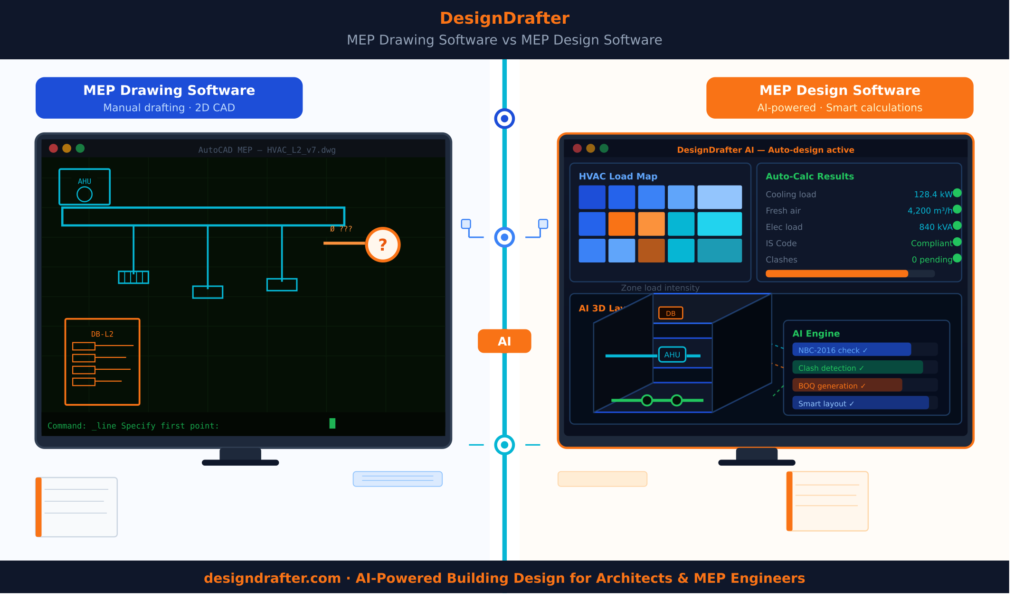
If you have spent any time in the building design industry, you have probably heard both terms used almost interchangeably. Someone on site says "we use MEP drawing software," while a consultant at a firm says "our team works on MEP design software." And most of the time, nobody stops to ask whether those two things are actually the same.
They are not. And that difference matters more than most engineers realize, especially when you are bidding for projects, coordinating across disciplines, or trying to reduce rework on a tight construction schedule.
This guide breaks down both categories clearly, explains what separates them, shows you what to look for when choosing the right tool, and walks you through how the MEP software landscape has shifted in 2026 with AI now sitting at the center of almost every serious workflow.
MEP drawing software is exactly what the name says: tools that help engineers and drafters produce technical drawings for mechanical, electrical, and plumbing systems in a building. These are your CAD-based environments, your drafting tools, your layout generators.
At its core, MEP drawing software handles the visual and spatial side of engineering work. You define duct routes, cable trays, pipe networks, electrical panel locations, and sprinkler heads on a drawing canvas, and the software helps you do that with precision, layering, and annotation.
Traditional tools that fall into this category include AutoCAD MEP, AutoCAD Electrical, and early versions of Revit MEP when used primarily as a documentation platform rather than a design engine.
The focus of drawing software is output: construction drawings, shop drawings, coordination drawings, and as-built documentation.
What drawing software typically does well:
What most drawing software does not do on its own:
MEP design software goes a layer deeper. It is not just about drawing systems. It is about engineering them. Design software handles the analytical, computational, and validation side of MEP work.
When an HVAC engineer sizes ducts based on room load and velocity requirements, that is design. When an electrical engineer calculates demand load, diversity factors, and fault current to size a cable and choose a breaker, that is design. When a plumbing consultant calculates friction loss across a pipe network to ensure pressure at each fixture point, that is design. MEP design software provides the calculation engine behind the drawing. It takes your inputs, such as building type, area, occupancy, climate data, equipment specs, and code standards, and produces validated, code-compliant outputs.
Modern MEP design software also connects those calculations to drawing generation, so a calculation does not just sit in a spreadsheet. It directly informs your layout, your symbols, and your documentation.
This is the core function of platforms like DesignDrafter's Building Design Calculation module, which automates electrical, HVAC, plumbing, and fire fighting calculations with outputs structured for Indian building codes including IS, NBC, ASHRAE, and NFPA standards.
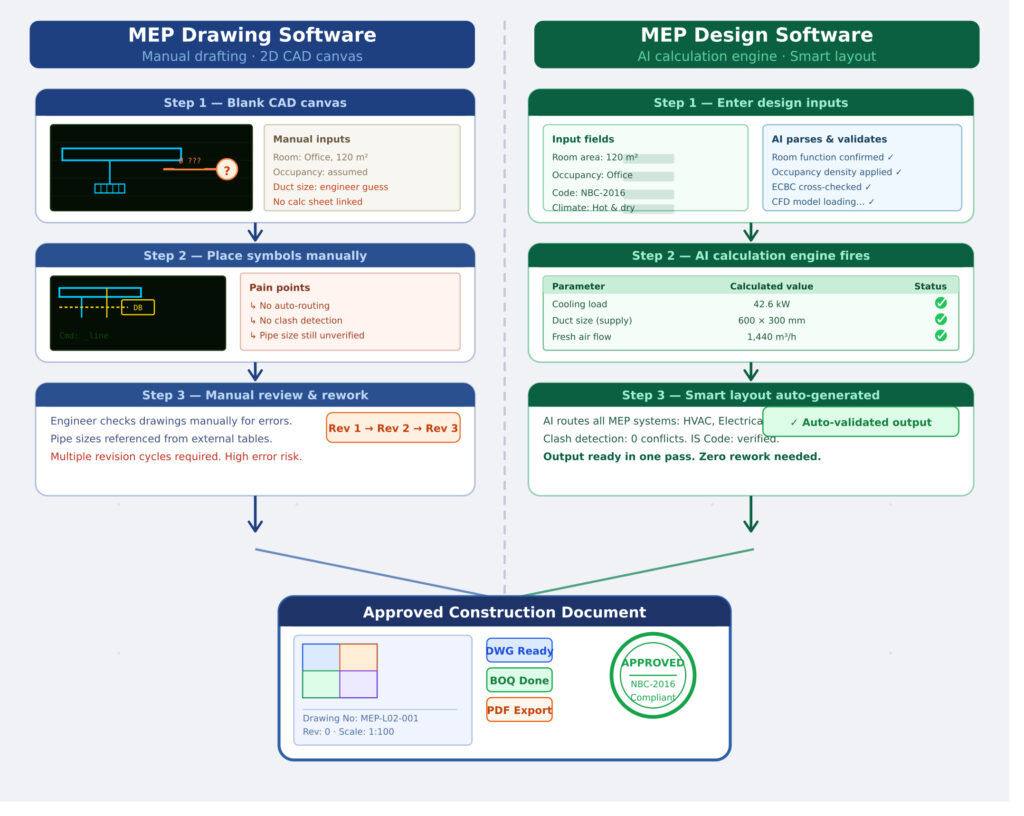
Here is a way to think about it that most engineers find useful.
Drawing software answers the question: "Where does this system go?"
Design software answers the question: "Will this system actually work?"
A duct drawn on a plan view is not the same as a duct that has been sized for the correct airflow, velocity, and static pressure for that specific space. A cable route drafted on a coordination drawing is not the same as a cable that has been sized for current carrying capacity, voltage drop, and protection coordination.
The gap between drawing and design is where most rework lives. Engineers produce a drawing based on experience and rough sizing, a contractor installs it, and somewhere during commissioning or QA, the system underperforms. Or the authority having jurisdiction rejects the submission because calculations were missing or non-compliant.
In a healthy workflow, drawing and design feed each other. You design the system first, and the design drives the drawing. Changes to the design automatically propagate to the drawing.
The problem is that historically, these two functions lived in separate software ecosystems. Excel handled the calculations. AutoCAD handled the drawing. And someone in the middle had to manually transfer data between them.
That is the workflow most MEP consultants in India are still running today, and it is one of the most significant sources of inefficiency, error, and rework in the industry.
To understand more about how MEP systems interact in a building context, the What is MEP in Construction guide on the DesignDrafter blog provides a solid foundation.
The expectations on MEP engineers have grown significantly in the last few years. Clients want faster turnaround. Projects have more complex coordination requirements. Indian building codes are being more strictly enforced. And the shift toward BIM as a delivery standard means drawings alone are not enough.
Here is what the modern MEP engineer actually needs from their software stack in 2026:
Speed without sacrificing accuracy. Engineers are expected to produce calculations and drawings faster than before. But faster cannot mean less accurate. The software needs to automate the repetitive parts while keeping the engineer in control of judgment calls.
Code compliance built in. Whether it is NBC, IS standards, ECBC, ASHRAE, or NFPA, the calculations need to reference the correct code and flag non-compliant outputs before they reach the drawing stage. Checking compliance manually after the fact is too slow and too error-prone.
Integration between calculation and drawing. The output of a calculation should feed directly into a drawing. If you size a duct in your calculation engine, that duct size should appear in your layout. If a circuit breaker is selected in your load schedule, it should be placed correctly in your distribution board drawing.
Multi-discipline coordination. MEP is never one discipline in isolation. Electrical, HVAC, plumbing, and fire fighting systems all share space and interact with each other and with the architectural model. Good software needs to account for spatial conflicts before construction.
Export compatibility. The software needs to produce outputs that work downstream: DWG for CAD teams, RVT for BIM modelers, PDF for submission, and Excel or PDF for BOQ and cost estimation.
Scalability. From a single residential unit to a large commercial complex, the tool should not force engineers to restart their workflow or switch platforms as project scale increases.
This is the shift that platforms like DesignDrafter are responding to: a single workspace that handles design calculations, layout generation, quantity takeoffs, and BIM automation without forcing engineers to juggle disconnected tools.
If your primary need is drawing production, here is what to evaluate:
Good MEP drawing software ships with comprehensive symbol libraries aligned to the standards your submission authority accepts. In India, this includes IS standards for electrical symbols and NBC-referenced graphical standards for fire and plumbing. A tool that forces you to build your own symbol library from scratch costs engineering time before a single drawing is produced.
MEP drawings involve dozens of overlapping systems. Your software needs a clean, structured layer management system so electrical, HVAC, and plumbing can each be toggled independently, checked for clashes, and sent to the right disciplines without confusion.
This is where the market has moved significantly. Rather than placing each symbol or routing each duct manually, modern drawing tools generate layouts automatically from inputs or calculations. DesignDrafter's Auto Layout Generation can take design calculation outputs and produce intelligent, clash-free MEP drawings for duct networks, pipe systems, and electrical cabling without the engineer manually placing each element.
The final product of a drawing workflow is a sheet ready for submission, review, or construction. The software needs to handle title blocks, north arrows, scale bars, revision clouds, dimension lines, and system legends efficiently.
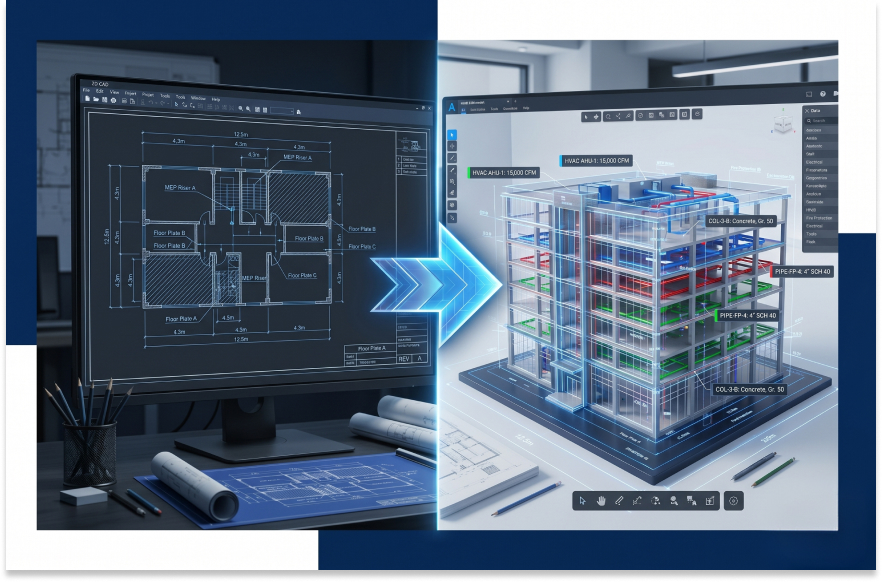
Outputs need to be compatible with AutoCAD DWG format for traditional delivery and Revit RVT format for BIM workflows. Platforms that also offer CAD to Revit conversion help teams bridge the gap between legacy CAD workflows and BIM delivery without full remodeling.
If calculation and engineering validation are your priority, here is what matters:
Look for load calculation, demand factor application, cable sizing, circuit breaker selection, voltage drop calculation, and fault current analysis. The engine should align with IS/IEC standards and produce outputs formatted for client reports and submission packages.
This covers room-by-room heat load calculation, psychrometric analysis, duct sizing, equipment selection, and energy performance checking. Standards alignment with ASHRAE 62.1, ASHRAE 90.1, ECBC, and ISHRAE is non-negotiable for Indian commercial projects.
Pipe sizing, fixture unit calculation, drainage stack design, pressure zone management, and compliance with IS:1172 and NBC requirements. Good plumbing design software also handles hot water system design and gray water management.
Sprinkler head layout, hydraulic calculation, pipe sizing to NFPA 13, hydrant network design, pump selection, and head loss analysis. Compliance with NBC Fire Chapter and NFPA 20 is critical for approval.
The most valuable feature in any design software is the ability to flag a calculation as non-compliant before it reaches the drawing. Integrated code checking eliminates the review-and-revise cycle that eats weeks on complex projects.
The DesignDrafter Design Calculation page shows how all four MEP disciplines, electrical, HVAC, fire, and plumbing, can be handled in a single integrated engine with structured, validated outputs.
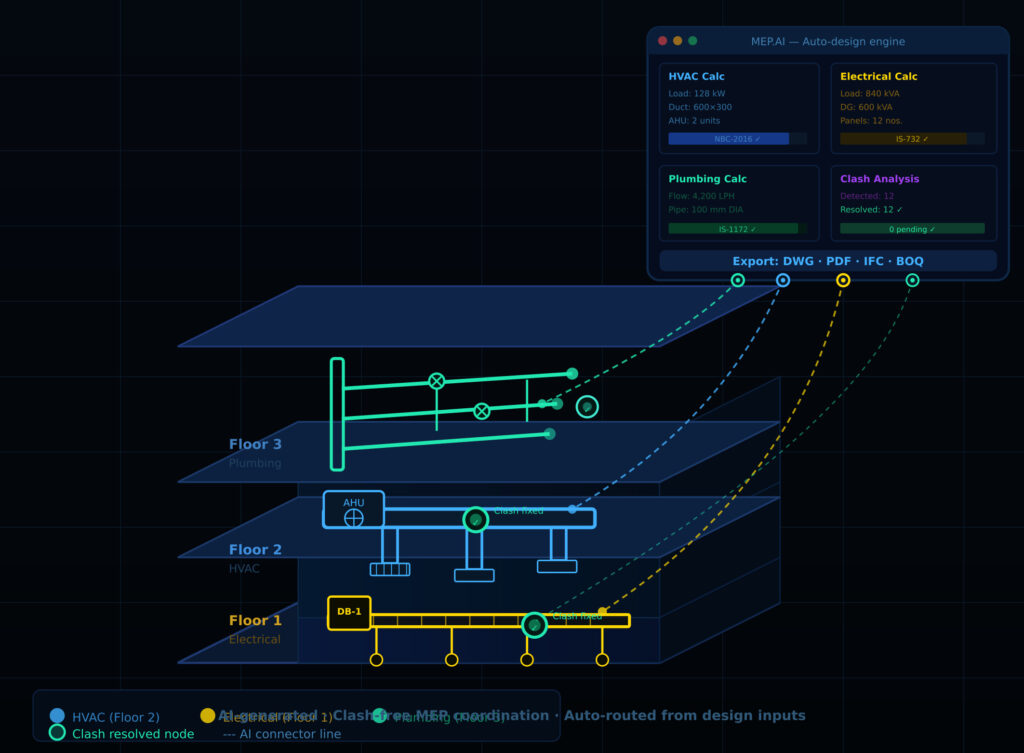
The most significant shift in both MEP drawing software and MEP design software over the last two years has been the integration of AI. And this is not AI as a marketing buzzword. The changes in actual engineering workflow are real and measurable.
Previously, generating an MEP layout for a mid-size commercial building meant a drafter spending days placing symbols, routing systems, and coordinating across disciplines. AI-powered layout generation changes this by reading design calculation outputs and automatically generating spatially intelligent layouts.
This is not just about speed. It is about the logic behind each placement. An AI-generated duct layout considers structural obstructions, ceiling heights, beam positions, and coordination zones for other services simultaneously. A human drafter doing the same task manually works sequentially and often has to revise when a spatial conflict appears.
On the design side, AI accelerates the iterative nature of MEP calculations. Instead of manually running a load calculation, adjusting equipment, recalculating, and repeating, an AI engine can run multiple scenarios simultaneously and surface the most efficient, code-compliant option.
AI also brings context memory to design. In a platform like DesignDrafter's AI Design Agent, the system remembers project parameters across sessions, so you are not re-entering building type, occupancy, and code requirements every time you run a new calculation.
One of the most expensive problems in MEP coordination is discovering clashes after modeling is complete, or worse, after construction has started. AI-driven clash detection identifies conflicts between MEP services and between MEP and structural elements early in the design phase. The detailed breakdown of AI clash detection in MEP coordination on the DesignDrafter blog goes deep into how this works in practice.
If you are working in the Indian construction industry, you know that generic global software often does not fit your workflow cleanly. There are specific differences in the Indian market that any MEP software needs to account for:
Code standards. India's building code environment includes NBC (National Building Code), IS standards from BIS, ECBC for energy performance, and local body regulations that vary by state. Software that is calibrated only for international codes like IBC or Eurocode requires extensive manual adjustment to produce India-compliant outputs.
Drawing convention. Indian consulting firms and approval authorities often expect drawings formatted to specific conventions: title block formats, symbol sets, and documentation structures that differ from US or European practice.
Project scale and diversity. Indian projects range from small individual house constructions to large integrated townships. Software that only performs well at one end of this range is of limited use to a consultant taking on varied project types.
BIM adoption stage. India's AEC industry is at a transitional point between traditional CAD-based delivery and full BIM. This means software needs to work well in both worlds, producing traditional 2D drawing outputs while also supporting BIM delivery where clients or contractors require it.
Cost sensitivity. Premium international MEP software licenses often run into several lakhs per seat per year. Indian consultants, especially small and mid-size firms, need capable tools at price points that make commercial sense.
This is the space that DesignDrafter's MEP Consultant solution specifically addresses: a platform built around the workflows, code standards, and project realities of the Indian MEP consulting industry.
Choosing the wrong software does not just cost money. It costs time, creates coordination problems, and sometimes affects the quality of technical submissions. These are the mistakes that come up most often:
Choosing drawing-only tools for design-heavy projects. If your firm takes on projects where MEP calculations are part of your deliverable, a tool that only handles drafting will force you to maintain a parallel spreadsheet workflow. The result is two separate systems that are never fully synchronized.
Over-investing in tools that exceed your workflow. Enterprise-grade MEP software with hundreds of features sounds impressive, but if your team uses 15% of the functionality and spends three months on training, the ROI does not work. Match the tool to your actual workflow complexity.
Ignoring integration with your downstream tools. If your client expects Revit deliverables and your drawing software only exports in a proprietary format, you will spend significant time on conversion. Check the export compatibility before you commit.
Not accounting for code localization. A calculation engine calibrated for US codes will not directly produce NBC-compliant outputs. Verify that the software has been configured for your specific regulatory environment.
Treating software as a replacement for engineering judgment. This bears saying clearly. MEP design software, including AI-powered platforms, automates computation. It does not replace the engineer's understanding of the system. Always review outputs critically.
Skipping the free trial. Most serious MEP software platforms offer trial access. Running a real project segment through the tool before committing tells you more than any demo video. DesignDrafter's free trial, for instance, gives engineers hands-on access with no credit card required, so teams can evaluate it against their actual project types.
The biggest single problem with the traditional MEP software stack is the gap between the calculation environment and the drawing environment. Design lives in Excel or in a standalone calculation tool. Drawing lives in CAD. And data flows between them manually, slowly, and imperfectly.
DesignDrafter is built to close that gap.
On the design side, it runs complete MEP calculations for electrical, HVAC, plumbing, and fire fighting systems in a single workspace, aligned with Indian and international codes. These are not simplified approximations. They are structured, validated, submission-ready engineering outputs.
On the drawing side, it uses those calculation outputs to automatically generate intelligent MEP layouts. Duct positions reflect calculated airflow paths. Cable routes reflect load schedules and circuit groupings. Pipe networks reflect pressure and flow requirements.
It also handles the BIM conversion layer through its CAD to Revit capability, which means teams that need to deliver BIM models do not have to restart their workflow from scratch. The detailed guide on MEP design calculations using AI explains exactly how the calculation modules work across disciplines.
For firms managing multiple projects simultaneously, the quantity takeoff automation means that once a design is complete and the layout is generated, the BOQ comes out automatically rather than requiring a separate manual count.
This is what a unified MEP design and drawing platform looks like in 2026: not two tools stitched together with exports, but a single workspace where design drives drawing, drawing drives BOQ, and the engineer stays in control throughout.
The distinction between MEP drawing software and MEP design software is not just semantic. It is the difference between a tool that shows you where something goes and a tool that tells you whether it will work. In a professional MEP consulting workflow, you need both, and you need them connected. The traditional approach of using AutoCAD for drawing and Excel for calculations has served the industry for decades, but it is showing its age. Rework from miscalculations, coordination failures from data not transferring between systems, and the time cost of maintaining two disconnected workflows are real operational problems.
The shift happening in 2026 is toward platforms that integrate design and drawing in a single workspace: one place where calculations drive layouts, layouts drive BOQs, and the whole output is structured for submission and BIM delivery. For Indian MEP consultants and design firms looking at this transition, the starting point is understanding exactly what your workflow requires and choosing a tool built for the regulatory environment and project scale you actually work with.
Start a free trial on DesignDrafter to see how integrated MEP design calculation and drawing generation work together in one platform, with no credit card required and access to all modules from day one.
FAQ

MEP drawing software is used to produce technical drawings for mechanical, electrical, and plumbing systems in buildings. It covers duct routing, pipe layouts, electrical cable paths, panel board drawings, sprinkler plans, and coordination drawings across all building services. The primary outputs are construction drawings, shop drawings, and submission documentation.
MEP design software handles engineering calculations: load analysis, equipment sizing, pipe sizing, duct sizing, and code compliance validation. MEP drawing software handles the production of technical drawings showing where systems are located. In a good modern workflow, design software calculates the system and drawing software generates the layout based on those calculations. Platforms like DesignDrafter combine both in one workspace.
For Indian engineers specifically, the best MEP design software is one that is calibrated to Indian codes including NBC, IS standards, ECBC, and ISHRAE guidelines, and produces outputs formatted for Indian approval submissions. DesignDrafter is designed specifically for this market, with all calculation modules built around Indian building code requirements and a pricing model suitable for Indian consulting firms.
Traditional MEP drawing software like AutoCAD MEP focuses primarily on layout and documentation and does not natively perform engineering calculations. You typically need a separate calculation tool or integrated design platform for that. AI-powered platforms that combine drawing and design in one environment are increasingly the preferred approach.
MEP design software is used to calculate, validate, and document mechanical, electrical, and plumbing systems for buildings before and during construction. It ensures that systems are correctly sized for the loads they will carry, compliant with applicable codes, and coordinated with each other and with the building structure. Outputs include calculation reports, load schedules, equipment specifications, and design drawings.
AI improves MEP drawing workflows by automating layout generation from design inputs, detecting spatial clashes before coordination reviews, routing systems intelligently around structural and spatial constraints, and generating annotation and sheet documentation automatically. This reduces drawing time significantly and produces layouts that are more technically sound than manual drafting.
MEP software and BIM software overlap but are not the same. BIM (Building Information Modeling) software like Revit is a modeling environment that creates intelligent 3D building models. MEP software focuses on engineering calculations and drawing production for mechanical, electrical, and plumbing systems. Many modern workflows use MEP design software to calculate and generate layouts, then export to BIM software for coordination, documentation, and facility management.
Good HVAC design software should cover room-by-room heat load calculation, psychrometric analysis, duct sizing using equal friction or velocity reduction methods, equipment selection, energy performance assessment under ASHRAE and ECBC standards, and report generation for client submissions. It should also connect HVAC calculations to duct layout generation so the drawing reflects the actual design.
Multi-discipline coordination in MEP software involves checking that electrical, HVAC, plumbing, and fire systems do not conflict spatially and that they are properly integrated with the architectural model. Good MEP software provides a shared project environment where all disciplines work from the same drawing and model data, with automated clash detection highlighting conflicts before they reach the construction stage.
No. MEP design software, including AI-powered platforms, automates calculations, generates layouts, validates code compliance, and produces documentation. However, engineering judgment, design decisions, system optimization, and professional responsibility all remain with the engineer. Software removes the repetitive computational burden so engineers can focus on the decisions that actually require expertise.
MEP design software in India ranges from free or low-cost entry tools to enterprise platforms costing several lakhs per year. For professional MEP consulting firms, platforms that offer integrated calculation and drawing generation at mid-market pricing are the most practical. DesignDrafter offers a free trial and paid plans starting at accessible rates for Indian firms, with pricing structured around project volumes rather than per-seat licensing that scales poorly for small teams.
Most professional MEP drawing software is designed to export to or work within AutoCAD DWG format and Revit RVT format. This compatibility is essential for project teams that deliver BIM models or coordinate with contractors using different tools. Platforms like DesignDrafter also offer CAD to Revit conversion to help teams move legacy drawing sets into BIM environments without manual remodeling.

April 16 , 2026
May 18 , 2026
April 27 , 2026